
Participant
January 27, 2023
Answered

Footnotes reference number disappearing when aligning numbers in table

  • January 27, 2023
  • 7 replies
  • 1130 views

Latest InDesign (18.1x64).

In a table, when trying to align the number on .  with tabs feature the reference number for footnote is disappearing if the text is left aligned. #

Please see video.


Do you know of any fix or it;s just a bug and forthis reason not fixable.


This topic has been closed for replies.
Correct answer Laubender

Hi @Gabriel23717186abix ,

after tinkering a bit with a table in InDesign 18.1 I can reproduce the bug!

Or at least I can make the footnote references go away. Not exactly the same what you are showing in your video.


When I apply the Adobe World-Ready Single-line Composer or the Adobe World-Ready Composer to the text of the table the footnote references simply vanish.


At the top the table text is formatted with the Adobe World-Ready Composer, at the bottom it's the Adobe Composer:
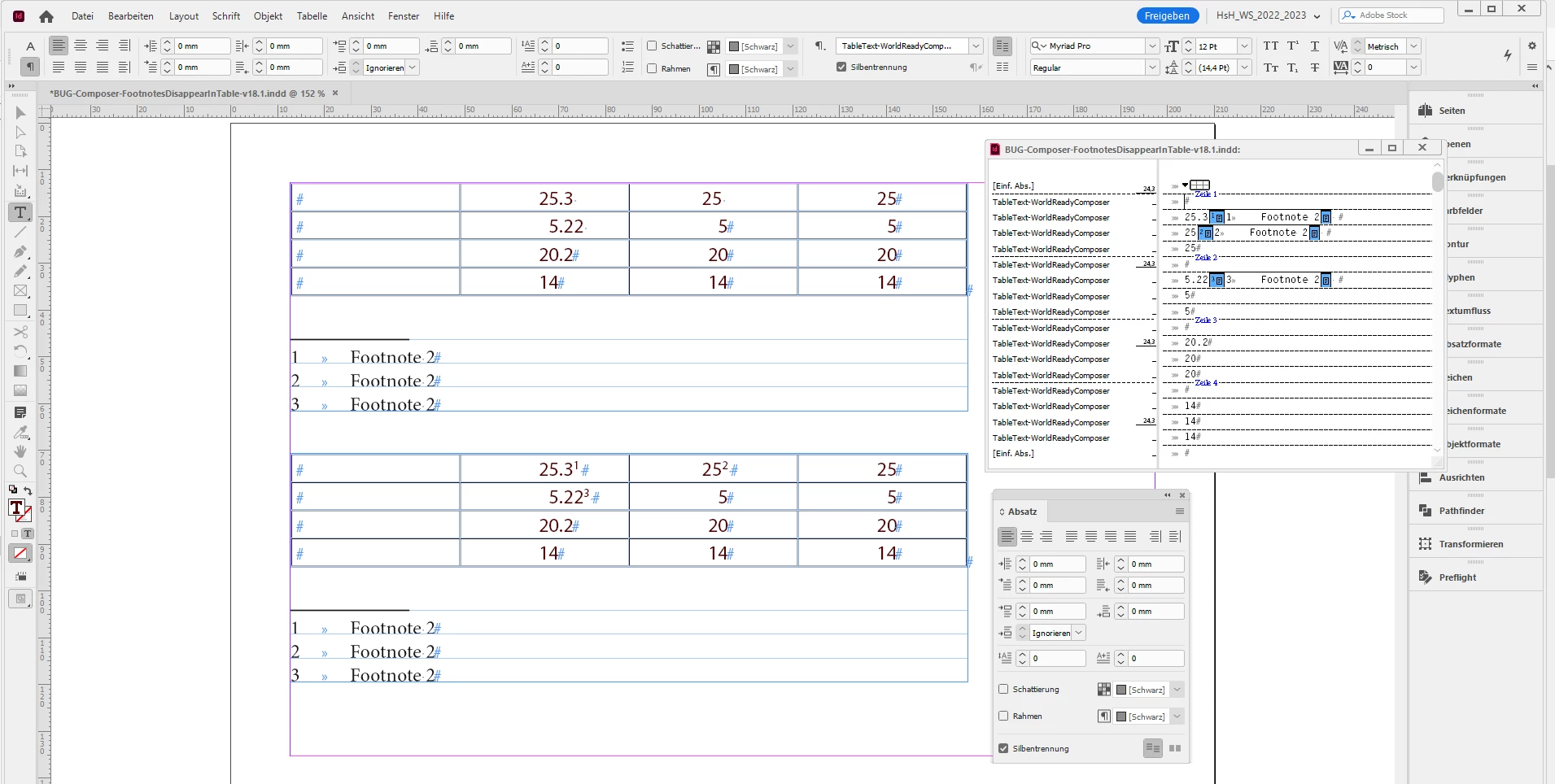
 

Attached the InDesign document:

BUG-Composer-FootnotesDisappearInTable-v18.1.indd


Regards,
Uwe Laubender
( Adobe Community Expert )

7 replies

Community Expert
January 31, 2023

Hi @Gabriel23717186abix ,

there is some news on details with this bug I want to share with you.

Thanks to Shlomit Heymann who tested on a ME version of InDesign.


Even when having applied one of the Adobe World-Ready Composers one can bring back the footnote references. And I think you've seen the same, just doing the opposite what I am doing to bring the references back.


It seems that the applied tab stops combined with the composer are the cause of the bug.

If I remove the tab stop, still the footnote references do not show up. But in the moment I use the menu command to remove them all, the footnote references are back:


Result of "Remove All":


Regards,
Uwe Laubender
( Adobe Community Expert )

Community Expert
January 30, 2023

Hi @Gabriel23717186abix ,

did a bug report at Adobe InDesign Uservoice:


[EPV] Footnote references vanish in tables when the Adobe World-Ready Composer is applied
Uwe Laubender, Jan 30, 2023

https://indesign.uservoice.com/forums/601180-adobe-indesign-bugs/suggestions/46243687--epv-footnote-references-vanish-in-tables-when-th


Please vote for fixing the bug.


Thanks,
Uwe Laubender
( Adobe Community Expert )

Participant
January 30, 2023

Dear all,


It looks like @Laubender  it's right. It's the composer bug. I have never got this one before.

@Peter Kahrel The colour it's just applied to the text (no character style, no nested style).


It was a file that i received from a contractor and the footnote references were missing only in the table. 

Attached is the sample test file if you still need it.


Thank you all for your great and fast responses.

Community Expert
January 27, 2023

Well, I can see the composer bug already with InDesign 2020 version 15.1.4.


So @Gabriel23717186abix ,

are you perhaps using the Adobe World-Ready Single-line Composer or the Adobe World-Ready Composer with the table text?


Regards,
Uwe Laubender
( Adobe Community Expert )

LaubenderCommunity ExpertCorrect answer
Community Expert
January 27, 2023

Hi @Gabriel23717186abix ,

after tinkering a bit with a table in InDesign 18.1 I can reproduce the bug!

Or at least I can make the footnote references go away. Not exactly the same what you are showing in your video.


When I apply the Adobe World-Ready Single-line Composer or the Adobe World-Ready Composer to the text of the table the footnote references simply vanish.


At the top the table text is formatted with the Adobe World-Ready Composer, at the bottom it's the Adobe Composer:


Attached the InDesign document:

BUG-Composer-FootnotesDisappearInTable-v18.1.indd


Regards,
Uwe Laubender
( Adobe Community Expert )

Community Expert
January 27, 2023

Hm.

I wonder how footnote 2 can be in a different cell when footnotes 1 and 3 share the same cell…


@Gabriel23717186abix ,

could you share a sample document with the table?


Regards,
Uwe Laubender
( Adobe Community Expert )

Peter Kahrel
Community Expert
Community Expert
January 27, 2023

Uwe -- Notes 1 and 3 are not in the same cell.

Community Expert
January 27, 2023

Thanks Peter,

I need a break. Or a weekend.


Regards,
Uwe Laubender
( Adobe Community Expert )


Peter Kahrel
Community Expert
Community Expert
January 27, 2023

I can't reproduce that here. Where does the colour come from? A character style? Do you have any nested styles in the paragraph style that might be triggered mysteriously by the alignment?