December 18, 2025
Answered

Footnotes restarting

  • December 18, 2025
  • 1 reply
  • 662 views

Hello everyone,


I have a book almost finished but I'm not getting to fix one issue. More or less in the middle of the document the footnotes are restarting from 1.

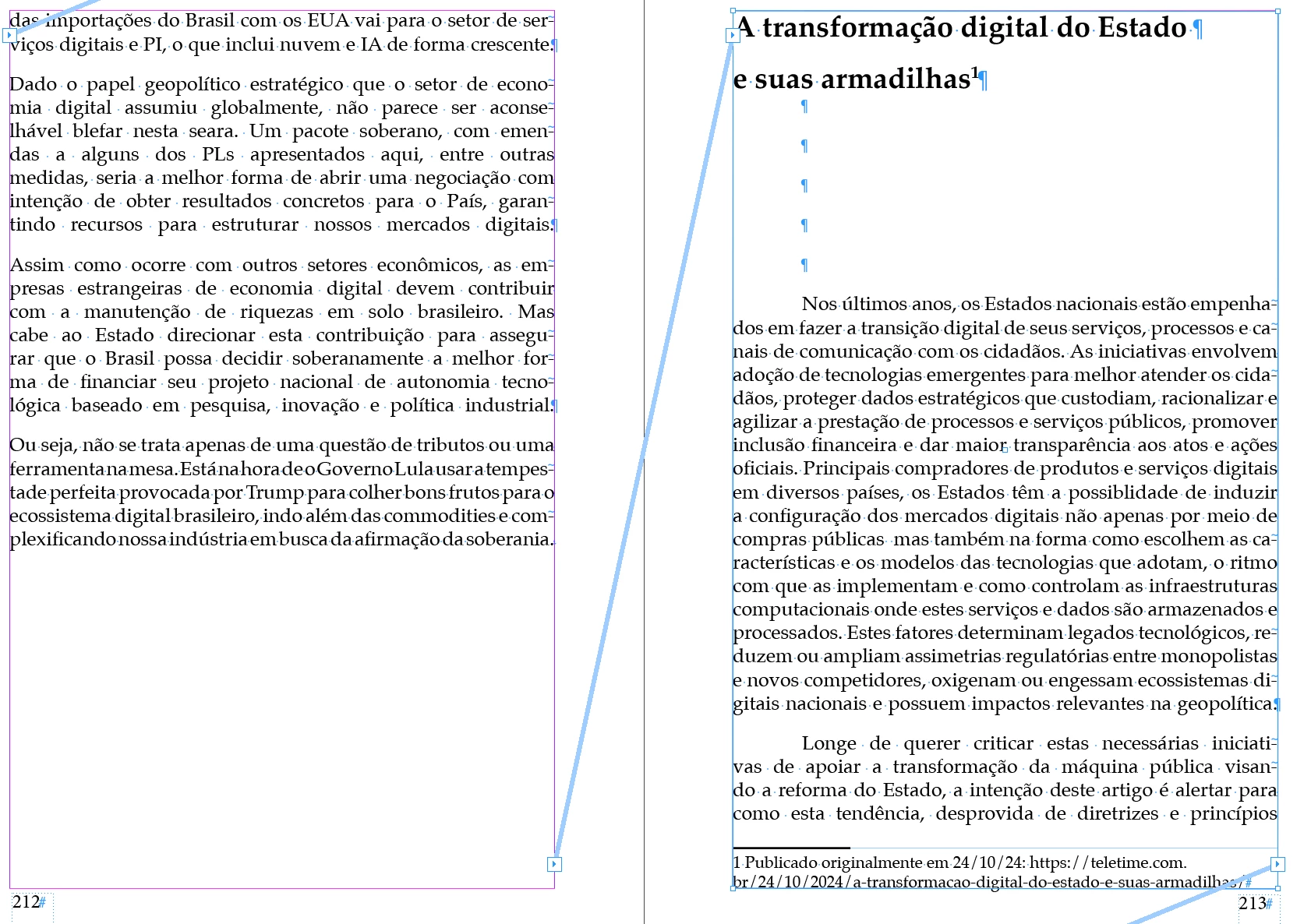
I already confirmed that the texts are linked (see the figure). How can I set it to the footnotes numbering flow through the entire document? 
 

Correct answer Peter Kahrel

I mean, I typed manually. Do you see the text links are ok, no?


On p. 210 you start a new story, which resets the footnote start number. Thread the frame to the one on the previous page and the note numbers continue as expected.


On p. 210 is another, empty, frame, which is threaded to the frame on p. 209. So if you select the frame on p. 209 it looks as if you have a continuously threaded story, but you don't.


PeterKahrel_0-1766082335845.png


1 reply

Peter Kahrel
Community Expert
Community Expert
December 18, 2025

Does the right-hand page start a new section and is footnote numbering set to start at each new section?

jgorgenAuthor
December 18, 2025

I don't create a new section by nyself and I don't know where I could change it. Could you help me?

James Görgen
Peter Kahrel
Community Expert
Community Expert
December 18, 2025

Activare the page, then open the Pages panel (Window > Pages). If you see a small black triangle above the page in the panel, the page starts a new section.

PeterKahrel_0-1766059877017.png

To remove it, open the Numbering & Section Options dialog: in the Pages panel, click the hamburger icon (the four small horizontal rules in the top-right of the Pages panel), then select Numbering & Section Options. Uncheck the Start Section checkbox.


PeterKahrel_1-1766059936295.png