

Mr_Bimg
Known Participant
July 20, 2021
Answered

Force InDesign to update links 'each time' after editing/save

  • July 20, 2021
  • 4 replies
  • 6708 views

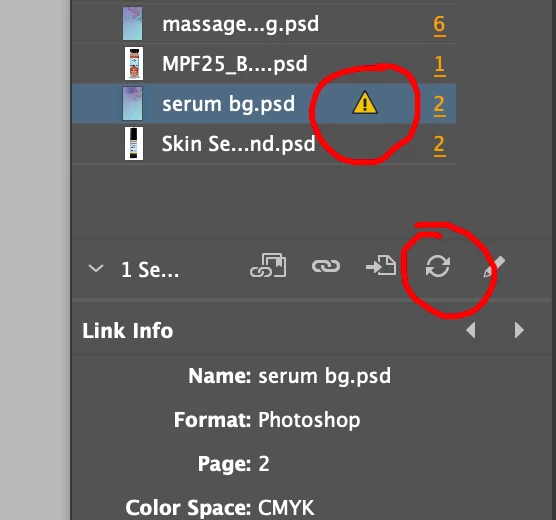
I'm trying to understand why IND will update links automatically the first time I save, but if I go back and edit the image again I have to go into the Links panel, select the image and click the update button each time. Is there a way to make IND automatically update each time so I can avoid the extra clicks? Sometimes I will go adjust a PS image multiple times to see how it looks in IND.

   

Correct answer John Mensinger

Instead of just switching back to Photoshop where the image is still open, Alt+Dbl-Click the image in InDesign. This sets up InDesign to capture the next save and apply the update.

4 replies

Participating Frequently
June 5, 2023

Yes, I am having the same issue as well. Sometimes it auto-updates after the save in Photoshop or Illustrator and sometimes it just won't so I have to go and click manually on the update link button, while performing the very same command. I am having all of the latest versions installed. 

artichoked
Inspiring
September 6, 2022

Still an issue in InDesign v17.4 on Monterey 12.5.1!


Here's the crazy part — Illustrator DOES this! Links update automatically every time the source file is altered, even while the PSD remains open. Why wouldn't this functionality be identical in both Illustrator AND InDesign?? If Adobe had to choose between the two (which is absurd), wouldn't it make more sense to auto-update links in a program that's dedicated to placing linked assets into a layout?
amib29632510
Participant
September 6, 2022

Even using Alt+Dbl-Click key commands that @artichoked suggested, I still have issues where it won't auto-update and I wait till the file completely saves in PS. I sure wish this would be quicker and more consistent! 

John Mensinger
Community Expert
John MensingerCommunity ExpertCorrect answer
Community Expert
July 20, 2021

Instead of just switching back to Photoshop where the image is still open, Alt+Dbl-Click the image in InDesign. This sets up InDesign to capture the next save and apply the update.

Mr_Bimg
Mr_BimgAuthor
Known Participant
July 20, 2021

This is the answer I've been looking for! I use both methods and couldn't figure out why sometimes it would update and other times not. This makes sense, although it would be great if IND could simply detect the edit/save from any entry point and make the update. I can relax now, Thanks John.

Community Expert
July 20, 2021

Problem

If you use the Edit With option in InDesign it opens the image for editing.

You save the image and return it to the layout and image updates.

============

If you go back to the image again - make changes - then InDesign won't update the image - because it's now been edited without using the Edit With from InDesign.

============

Solution

After making your edits to the image - close the image.

It will update in InDesign

If you need to make further edits then choose Edit With again from InDesign.


This restarts the process.


===

This is how it works - any image edited outside the compounds of InDesign will be treated as a link that needs updating.

It's only ever auto updating the link if you use Edit With from the InDesign options.


Dan Greyhound
Inspiring
October 4, 2023

This used to work for me, but now it doesn't. Any ideas?