
Participant
June 16, 2022
Answered

Form Text Field with integrated line, like a border

  • June 16, 2022
  • 3 replies
  • 1369 views

Thanks in advance for reading.

I want to make a form text field with the line attached. You can attach a border, surely also a line?


I make tons of forms. The usual 'best practice' involves creating a line and text field separately. It occurs to me now how absurd this is. 


So many form functions still involve an indesign-to-acrobat workflow. The impetus for this post: I write javascript in acrobat for dropdowns that display or hide other form fields. This is simple enough for fields, but I don't have a good solution for hiding/displaying the line itself.


Please my friends, advice?


InDesign, Acrobat, Javascript, form text fields, dropdowns, Best Practice, Interactive PDF
This topic has been closed for replies.
Correct answer Jeffrey_Smith

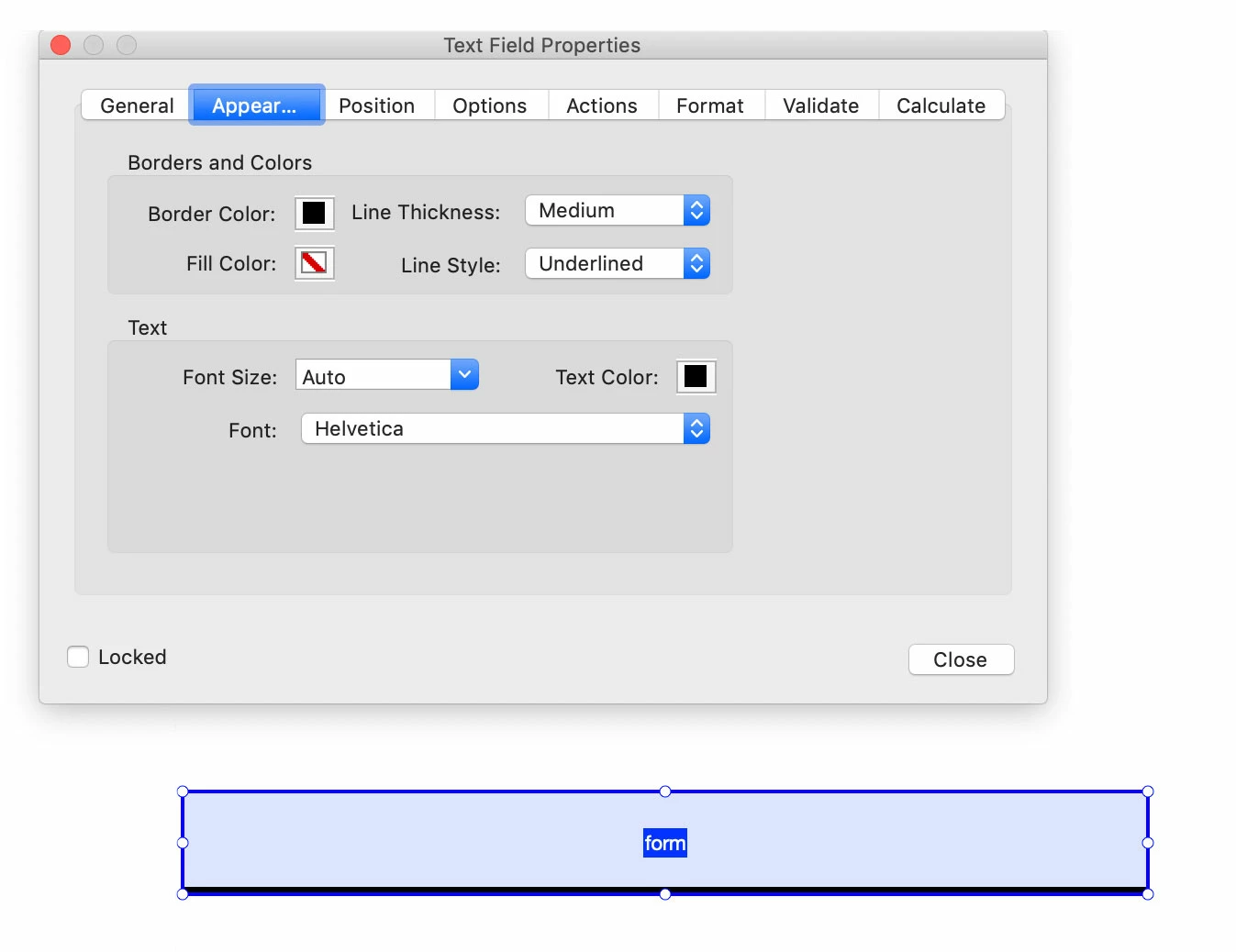
In Acrobat, Form Field Properties, Line Style: Underlined

3 replies

TᴀW
Legend
June 16, 2022

The code for applying the underline to a form field in Acrobat is:

this.getField("Text Field 1").borderStyle = border.u

(Obviously, replacing "Text Field 1" with the name of your field.)

Natively, you can't add Acrobat scripts in InDesign, so you need to do it in Acrobat, as you say.

With my (not free) InDesign add-on FormMaker (FormMaker – Id-Extras.com) you can add Acrobat scripts to a form in InDesign.

In such a case, you could add the above line of code as a "Document" script.

If you do that, then when the user opens the PDF, it will turn the border of the text field in question to an underline.

(In fact, at that point you could delete the document script, save the PDF in Acrobat, and the field will be set with an underline permanently.)

Ariel


Visit www.id-extras.com for powerful InDesign scripts that save hours of work — automation, batch tools, and workflow boosters for serious designers.
Jeffrey_SmithCommunity ExpertCorrect answer
Community Expert
June 16, 2022

In Acrobat, Form Field Properties, Line Style: Underlined

BobLevine
Community Expert
Community Expert
June 16, 2022

There is certainly no InDesign solution. Pop over to the Acrobat forum and see if anyone can offer advice there.

Participant
June 16, 2022

Appreciate it, Bob.