
Participant
October 22, 2019
Answered

Formatting

  • October 22, 2019
  • 1 reply
  • 349 views

I am sure there is an easy way to do this - but I don't know what it is ...


My company has quite a strict brand. Four colours. Square bullets. A specific font. 

When I paste text into a document and I want to bullet the text, I have to:


Select the text and make it all red so the bullets go red

Insert a hair space between the bullet and the text

Select each line of text and make it a second corporate colour


This is a nightmare when I am doing half a page of text. At the moment, I am doing a 10 page document and slowly losing my mind. Any suggestions very gratefully received.
    This topic has been closed for replies.
    Correct answer SJRiegel

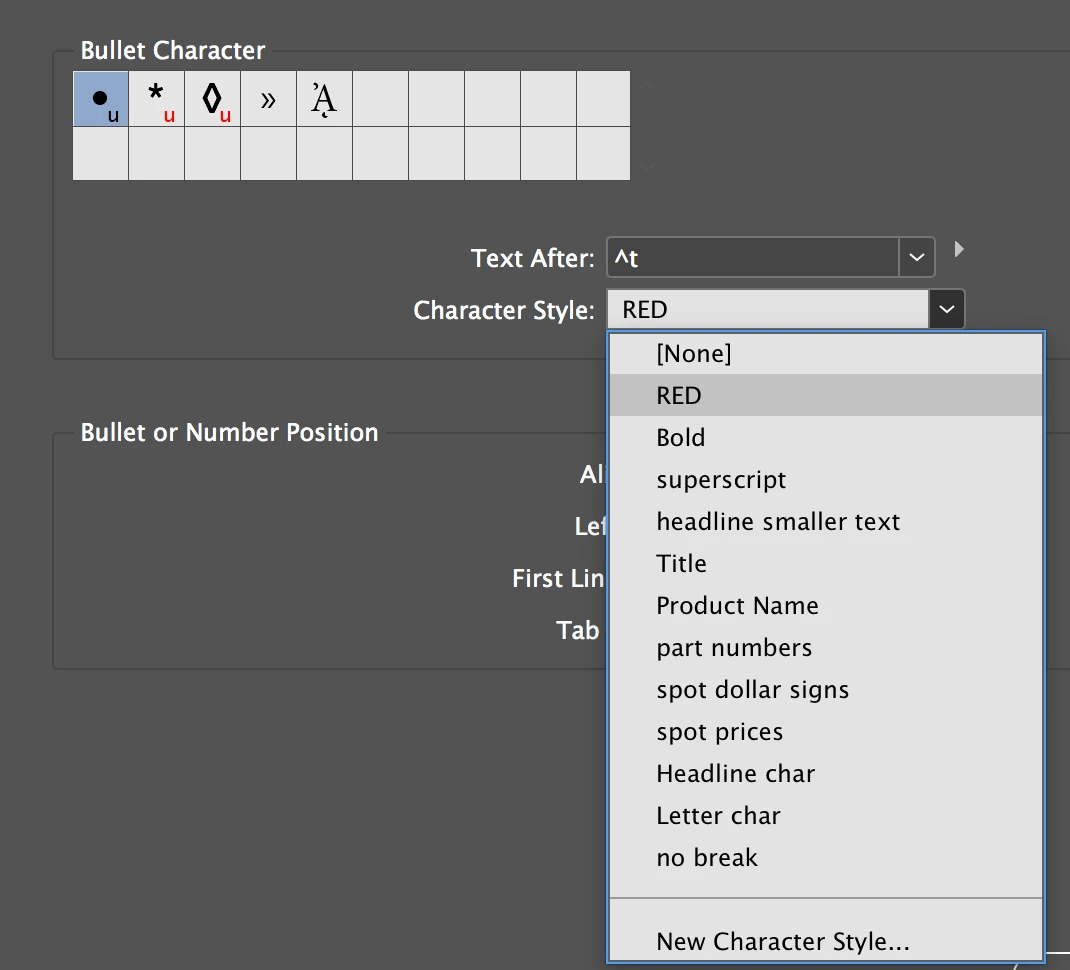
    Set up a bulleted paragraph style. This will allow you to apply a character style to the bullets that has a different color from your primary text.

    1 reply

    SJRiegelCorrect answer
    Legend
    October 22, 2019

    Set up a bulleted paragraph style. This will allow you to apply a character style to the bullets that has a different color from your primary text.

    Known Participant
    January 27, 2020

    Is there any way to automate the application of character in paragraph style via Script?