
Inspiring
October 19, 2019
Question

Formatting EPUB with line numbers

  • October 19, 2019
  • 4 replies
  • 1542 views

Hi, I'm trying to format a long poem as an EPUB, and it needs to have line numbers for every fifth line.

Here is an example of what I want it to look like:
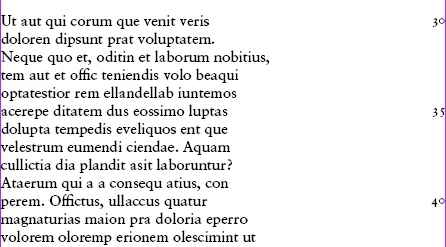
When the reader enlarges the font, some lines may run on to the next line. I want the numbering to accomodate this, for example:
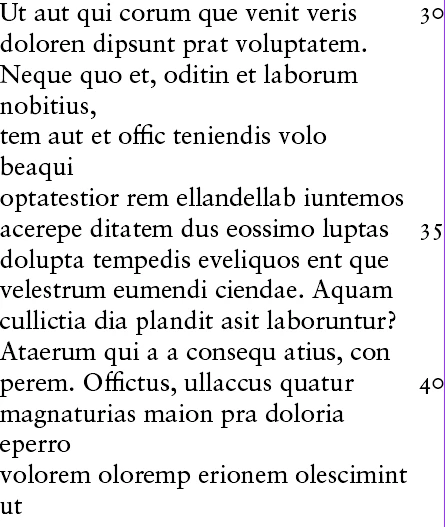
Note that line number 35 still begins with the word "acerepe", etc.

How can this be achieved in InDesign? I have seen an EPUB where this is done, so I'm quite sure it's possible.

Thanks for your help.

This topic has been closed for replies.

4 replies

Barb Binder
Community Expert
Community Expert
October 19, 2019

Hi Jongware: If you use a table the content will reflow, but the line numbers will also reflow and won't line up.


~Barb


~Barb at Rocky Mountain Training
Barb Binder
Community Expert
Community Expert
October 19, 2019

Hi Rex: Do you need this to be a reflowable ePub? This works well for a fixed-layout ePub.

I don't see how you can accomplish this as a reflowable ePub—they are designed to reflow when viewed on different screen sizes and orientation. When layout is important, use a fixed-layout ePub.


~Barb

~Barb at Rocky Mountain Training
Jongware
Community Expert
Community Expert
October 19, 2019

> they are designed to reflow

What happens to tables?

rayek.elfin
Legend
October 19, 2019

InDesign doesn't technically have this function. A clunky work-around is putting a second column beside the main text, of course:

https://indesignsecrets.com/numbering-lines-of-text.php


I recall a couple of plugins:

https://www.id-extras.com/products/line-numbers/

http://store.eprinttools.in/index.php?route=product/product&product_id=71


And a free script:

https://indesignsecrets.com/quickly-add-line-numbers-with-this-free-script.php

Barb Binder
Community Expert
Community Expert
October 19, 2019

Hi Rex: You will have to run a separate story alongside of the poem.


You can get Excel to type up the list of numbers for by typing 5, 10 into two empy cells and then using the fill handle to repeat the list by 5s (see https://support.office.com/en-us/article/automatically-number-rows-76ce49e3-d8d2-459b-bd85-ee1d3973e6e6).


Then place a threaded frame next to the story, paste in the numbers, align the top number with line 5 and set the space after to 5x the leading for the paragraph so that they automatically line up correctly. 


~Barb


~Barb at Rocky Mountain Training
Inspiring
October 19, 2019

Thanks Barb. This is how I've formatted the print version already, so this solution is handy for me.

I have two separate text boxes: one for text, one for numbers. When I export to EPUB, the EPUB shows all the text first, then all the line numbers. I'm not sure how to get these to show side-by-side in the EPUB.