

celinee91219716
Participant
August 15, 2023
Answered

Formatting Numbered Nested Lists

  • August 15, 2023
  • 1 reply
  • 534 views

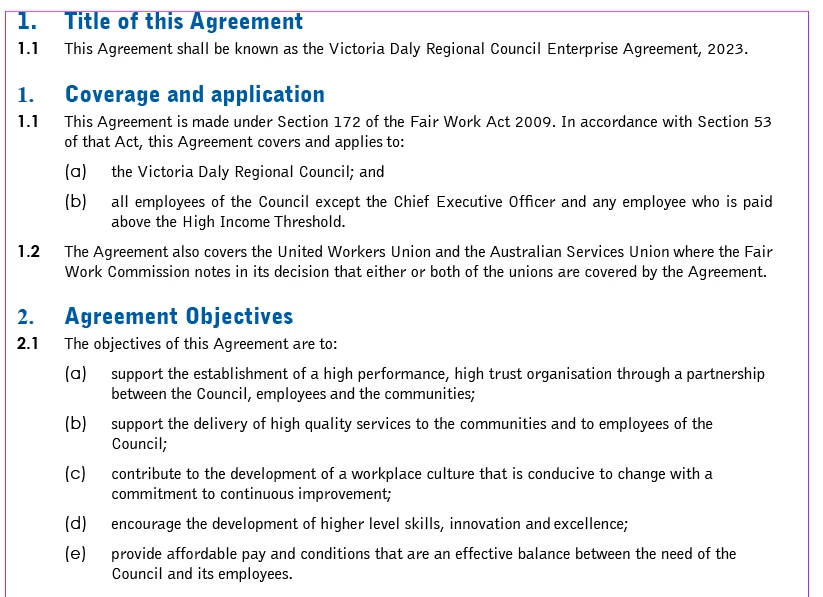
I hope someone can help me out. My InDesign skills are somewhat basic so this might be an easy one to answer.
I'm importing text from a Word Doc which has numerous nested lists.
The formatting from the Word Doc carries over but for the very first header.
I'd like to change the Numbered List font to match that of the header.
I've been able to do it to the first one, but that only made the 2nd point convert to point number one, which has then changed the nested lists to reflect this.
Here's a screenshot of my dilema.
This topic has been closed for replies.
Correct answer Eugene Tyson

Have no fear - I had the same question many years ago!
https://creativepro.com/multi-level-automatic-numbering-in-indesign/


You can see in then Numbering Options that you can apply a Character Style for the number

Create your Character Style for your number

Then when editing the Paragraph Style that contains the numbering ensure you apply the Character Style you created. 


1 reply

Eugene TysonCommunity ExpertCorrect answer
Community Expert
August 19, 2023

Have no fear - I had the same question many years ago!
https://creativepro.com/multi-level-automatic-numbering-in-indesign/


You can see in then Numbering Options that you can apply a Character Style for the number

Create your Character Style for your number

Then when editing the Paragraph Style that contains the numbering ensure you apply the Character Style you created. 


celinee91219716
Participant
August 20, 2023

Thank you so much Eugene!
I do know of and really like David Blatner 🙂
If anyone comes across this problem, I also found this YouTube video very helpful.
https://www.youtube.com/watch?v=y4dfFRwDAJw

Thank you for reaching out and solving my problem.