
Participating Frequently
September 12, 2023
Question

Formatting table from excel

  • September 12, 2023
  • 4 replies
  • 206 views

I am pasting a range from a spreadsheet into an InDesign page. It looks like this: 
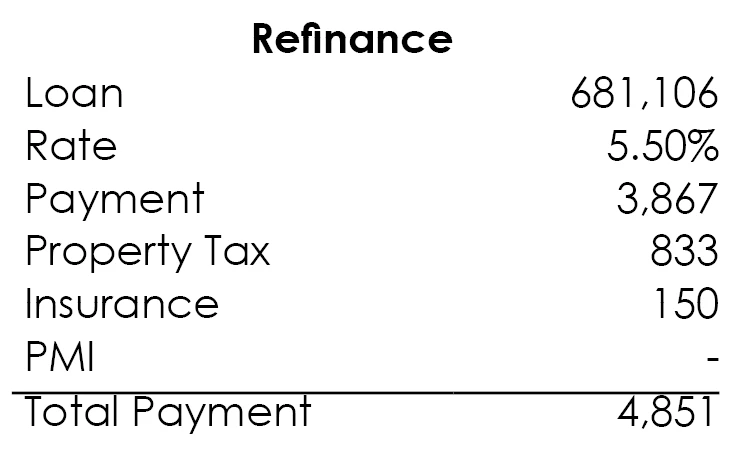
I am trying to increase the padding between the "Total Payment" row and the rule immediately above.

I have selected the row and edited the Cell style by adding Cell Insets, but it has no effect. I have also tried to set vertical alignment to "Center." Also no effect.

I'm sure I'm missing something really obvious. Any ideas?

This topic has been closed for replies.

4 replies

Dave Creamer of IDEAS
Community Expert
Community Expert
September 12, 2023

Try selecting the cells and remove any cell style overrides. 


Personally, I like to create (in order):

  1. paragraph styles used in the table,
  2. cell styles linked to the paragraph styles, and finally
  3. a table style to connect them all together. 
  4.  

Also, I usually Place the Excel file to remove any incoming formatting. 

The last line would be an additional cell style that would be applied manually after the table style. 

David Creamer: Community Expert (ACI and ACE 1995-2023)
Community Expert
September 12, 2023

Well, my reply above can't be the solution and the correct answer. I only asked you to share a sample of the table.

How did you resolve the issue?


Regards,
Uwe Laubender
( Adobe Community Expert )

Community Expert
September 12, 2023

Hi @JMParsons ,

copy the frame with that table to a new document.

Share the document with us and attach it to a reply using the forum's editor and controls.

We'll be able to solve this.


Regards,
Uwe Laubender
( Adobe Community Expert )