Lexi Traum
Participant
February 19, 2024
Answered

Formatting text in InDesign

  • February 19, 2024
  • 1 reply
  • 279 views

I want to create a brochure that looks like this 


Name........................................Info 


I used to know how to have the dots filled in based on space, but I cant remeber now. 

Does anyone know how to have this fill in so I dont have to type them all individialy? 
This topic has been closed for replies.
Correct answer James Gifford—NitroPress

You probably want a leader tab.


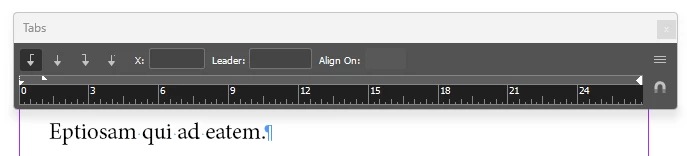
Open the Tab window over the text you want to adjust (Ctrl-Shift-T):


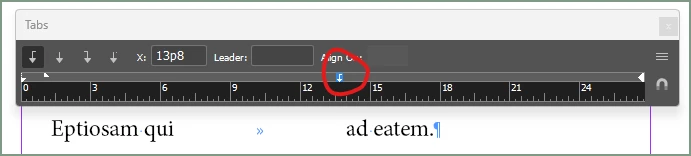
Click in the gray bar to place your tab:


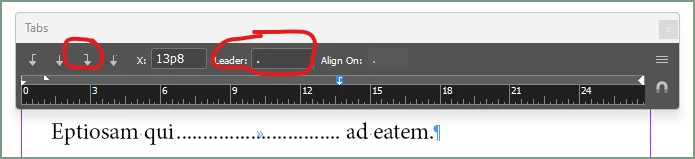
With that tab still selected (highlighted in blue) click the tab type you want, probably a right-justfied tab, and type the character or short character string you want to appear as the "leader" across the word space, in this case just one period:


Lots of adjustments from there, and note that you can use (for example) a period-space to change the spacing of the leader dots.


For more details, look up 'InDesign leader tabs" in your favorite search tool.

1 reply

James Gifford—NitroPress
Legend
February 19, 2024

You probably want a leader tab.


Open the Tab window over the text you want to adjust (Ctrl-Shift-T):


Click in the gray bar to place your tab:


With that tab still selected (highlighted in blue) click the tab type you want, probably a right-justfied tab, and type the character or short character string you want to appear as the "leader" across the word space, in this case just one period:


Lots of adjustments from there, and note that you can use (for example) a period-space to change the spacing of the leader dots.


For more details, look up 'InDesign leader tabs" in your favorite search tool.

Lexi Traum
Participant
February 19, 2024

Thank you soooooo much!!!! This was so helpful!