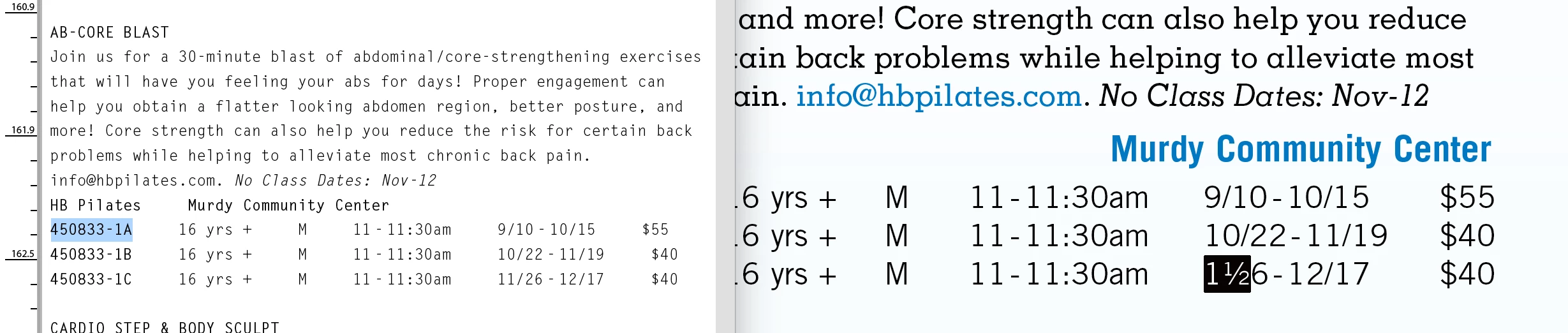
You have enabled an OpenType feature as a default: "Fractions" *. You did that using one of these methods:
– having nothing selected at all and enabling it through the Character panel;
– having a dedicated Character Style for it (intentionally or by accident) and having that character style, in turn, enabled as a default for new text frames;
– manually enabling it in a Paragraph style "just to see what happens";
– having some text selected where it was applied manually and selecting "Redefine Paragraph Style".
– probably a ton more. (Yes, InDesign is very versatile – if you know what you are doing.)
You can go over all of these options and check them one by one (and I am sure you will ultimately find you applied it through yet another way that I did not list), or just select all text and disable the feature using the Character panel menu.
* Some OpenType fonts contain code to correctly create proper fractions out of any sequence of "digit / digit"; for example, Minion Pro does this correctly. Other font designers only include a straight conversion from 1/2, 1/4, and 3/4 to the precomposed characters ½, ¼, and ¾ (and some designers even don't bother to do that).

 AdChoices