Inspiring
May 25, 2025
Question

fractions to look right

  • May 25, 2025
  • 3 replies
  • 494 views

any way to get all these fractions to look right without using glyphs?
 

3 replies

Barb Binder
Community Expert
Community Expert
May 25, 2025
how do I know if i'm using an opentype font?
  • Type > Find/Replace Font
  • Select the font name being used for the fractions in the list at the top
  • Click the More Info button (once clicked, it shows Less Info) to see the font information


~Barb

~Barb at Rocky Mountain Training
Randy Hagan
Community Expert
Community Expert
May 25, 2025

If you're using OpenType fonts, you can use its specialized functions to make typographically correct fractions, like I'll show in the exercise below.


First, choose an OpenType font. For the illustration below I used the default Minion Pro font installed with InDesign.


Then, type out your desired fractional value. In my illustration below, I typed the fraction value 37/64. Highlight the type.


Now, go to your Control Panel above your document window. At the far right is a button with three horizontal lines. That's generally known as the Hamburger Menu, or specifically for InDesign the Flyaway Menu. Click on it, and select the OpenType>Fractions sub-menu command, as shown at right.


Once you apply the OpenType>Fractions command, using an OpenType font, you can make any fraction you want look like the example shown below:


If you're really picky, you can apply custom kerning on both sides of the fractional slash and  between the 3 and 7 to make this precisely, typographically, excellent. But for text purposes, it's probably fine as it is.


Hope this helps,


Randy

Inspiring
May 25, 2025

thank you,

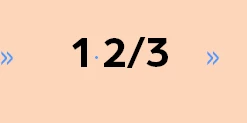
doing this gives a different look though than using the glyphs.


Note that the 2/3 is what I used open type for and the 1/2 is done with a glyph


BobLevine
Community Expert
Community Expert
May 25, 2025

Best to use one method or the other. I'd be shocked at this point if you weren't using an OpenType font but that doesn't mean it has fractions as a feature. That would typically only be in a pro version of the font.

Inspiring
May 25, 2025

I don't have third options in the glyphs.


BobLevine
Community Expert
Community Expert
May 25, 2025

As Randy says, use a Pro Opentype font that contains fractions. Once you follow those instructions, if you're going to make heavy use of this, a character style will make things easier to apply.


If you have to use the current font and it doesn't have fractions you can look into this: Proper Fraction: How to Make Fractions Automatically in InDesign & InCopy


It's an older script so I can't vouch for how well it will work in a new version of InDesign.
