
Participant
July 17, 2023
Answered

Frage zum Export / Genaue Abmessungen / Weiße Datei

  • July 17, 2023
  • 1 reply
  • 175 views

Hallo,


ich habe ein Design für einen Stempel entworfen und muss dieses jetzt für die Druckerei als TIFF, JPG oder PDF ausgeben. Die Druckerei fordert genau 59 x 39 mm und mindestens 600 dpi (Siehe Vorlage im Anhang).


Und ich habe noch ein zweites Problem: wenn ich eine Datei exportiere, kriege ich nur ein weißes Bild, der Inhalt fehlt.


Wie kann ich das mit InDesign schaffen? Vielleicht kann mir jemand helfen.


Danke!
This topic has been closed for replies.
Correct answer Eugene Tyson

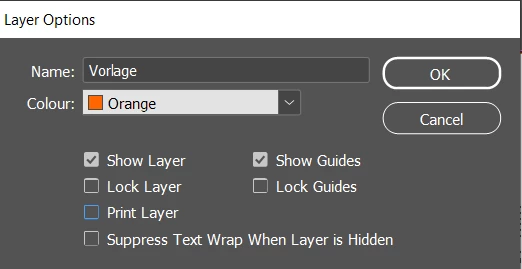
Double click your Orange layer - it's not set to print


With this Print Layer turned off it will not print - the clue is in the Layers panel when a Layer is in Italics it means it's not set to print.


You have it set correctly in terms of size.

In terms of DPI it depends what's going onto the document - a PDF should be fin if it's just text - and vector elements then DPI won't come into play.


If it's raster images - then check the Effective PPI in the Window>Links panel to see what the effective ppi is.


If you want to send a TIFF - then you should export to PDF first.

Then open the PDF in Photoshop - which rasterises everything - you will be given the option to insert dimensions and resolution.

I don't really recommend this.


A PDF directly from InDesign with no compression would be best (see your compression settings on export to PDF).

1 reply

Eugene TysonCommunity ExpertCorrect answer
Community Expert
July 18, 2023

Double click your Orange layer - it's not set to print


With this Print Layer turned off it will not print - the clue is in the Layers panel when a Layer is in Italics it means it's not set to print.


You have it set correctly in terms of size.

In terms of DPI it depends what's going onto the document - a PDF should be fin if it's just text - and vector elements then DPI won't come into play.


If it's raster images - then check the Effective PPI in the Window>Links panel to see what the effective ppi is.


If you want to send a TIFF - then you should export to PDF first.

Then open the PDF in Photoshop - which rasterises everything - you will be given the option to insert dimensions and resolution.

I don't really recommend this.


A PDF directly from InDesign with no compression would be best (see your compression settings on export to PDF).

Participant
July 18, 2023

Thanks Eugene for the correct answer!