
Answered
Full Screen Mode, How?
How do I force InDesign into full screen work mode where I don't see this "window" of the document with Window control buttons?
I want the maximum work space.
And does Indesign CC have a Mac style full screen mode?

How do I force InDesign into full screen work mode where I don't see this "window" of the document with Window control buttons?
I want the maximum work space.
And does Indesign CC have a Mac style full screen mode?
InDesign has a fullscreen mode which you get to by pressing Shift-W. But you can't work in that mode. It's more for presentations. (In fact, it's called Presentation mode.)
If you want to get rid of the red, yellow, green buttons, you want the documents to be set as tabs. You can drag them up to make tabs or go to Preferences > Interface > Open documents as tabs.
Perhaps with tabbed documents and using Shift-tab or tab you will get what you're looking for.
No, that's not it.
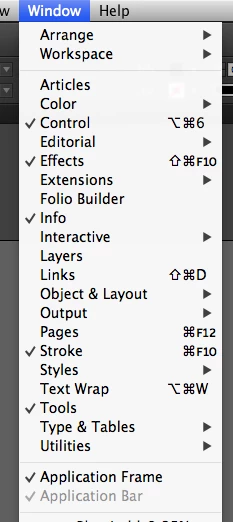
Found it:
[Aplication Frame] down the bottom.
Someone is out now, trying to find a more obscure way to name "full window, but not full window" functionality.
Best of luck, kids.
Already have an account? Login
Enter your E-mail address. We'll send you an e-mail with instructions to reset your password.
 AdChoices