Participant
July 10, 2024
Answered

Function "ADD PAGE" in interactive PDF

  • July 10, 2024
  • 1 reply
  • 240 views

Hi guys, have a look at the PDF attached. At the bottom is a button "add page" and "delete current page".
How was this function created? Adding page is duplicating page 2 as often as wanted, and adds the correct page number too (with flaws sometime).

Is it possible to create an interactive PDF like this from InDesign??? 🧐

TIA! Andrea

This topic has been closed for replies.
Correct answer Joel Cherney

Is it possible to create an interactive PDF like this from InDesign??? 🧐


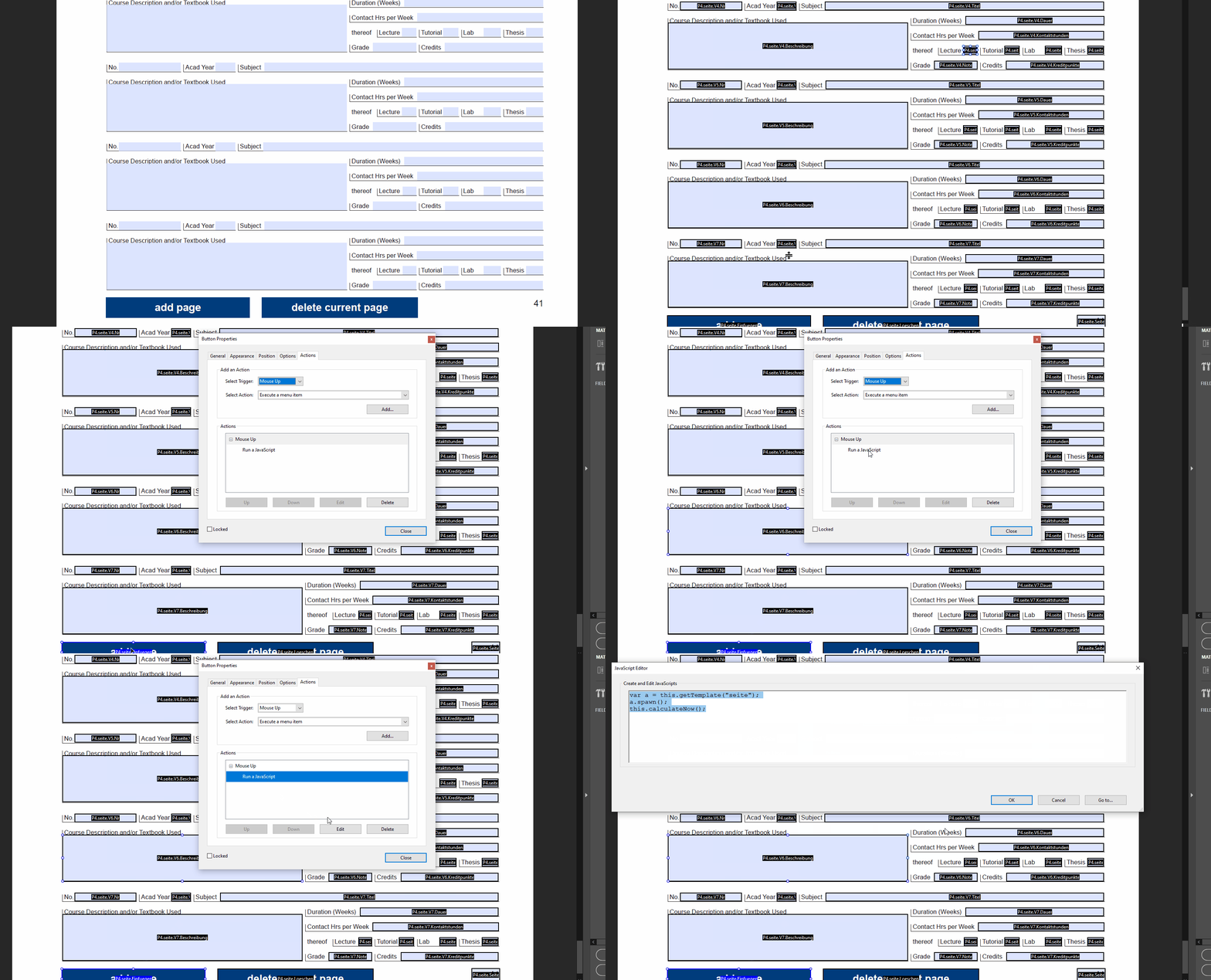
Kinda. I mean, if you go to the PDF Properties (control-D or command-D depending on platform) and look at the Application on the Description tab, then you'll see that this PDF started its life in InDesign. However, I'm fairly sure that some post-production had to take place in Acrobat. If you look at InDesign's Buttons and Forms, you'll find that there is no "Run a Javascript" option as a button action. However, you can add JS to a button after the fact in Acrobat:


1 reply

Joel Cherney
Community Expert
Joel CherneyCommunity ExpertCorrect answer
Community Expert
July 10, 2024

Is it possible to create an interactive PDF like this from InDesign??? 🧐


Kinda. I mean, if you go to the PDF Properties (control-D or command-D depending on platform) and look at the Application on the Description tab, then you'll see that this PDF started its life in InDesign. However, I'm fairly sure that some post-production had to take place in Acrobat. If you look at InDesign's Buttons and Forms, you'll find that there is no "Run a Javascript" option as a button action. However, you can add JS to a button after the fact in Acrobat: