


Participant
December 16, 2019
Answered

Gap between footnotes (solved)

  • December 16, 2019
  • 2 replies
  • 8055 views

Hi,
I need to reduce space between footnotes.

Please see image below:
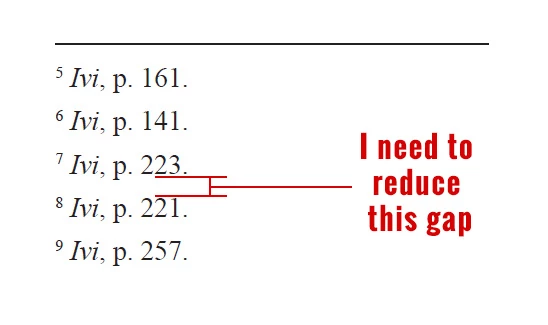
"Space Between Footnotes" in "Document Footnotes Option" is already set to 0.
Footnotes paragraph style has no spacing before or after, I tried changing it's leading.
No joy.

I tried changing footnotes charactert style leading.
No joy.

I use nested character style for drop caps in footnotes.
I tried changing its leading.
No joy.

I searched forums and tryed all kind of possible solutions.
Nothing worked for me.

Any help?
Thankyou

Correct answer datap6156868

hey there, try the above option

2 replies

Jongware
Community Expert
Community Expert
December 16, 2019

Don't use character styles for paragraphs. Changing the size of that 'gap' – it actually is just a regular paragraph leading – works for me if I change Leading in my paragraph style for footnotes.


Of course it cannot should not be made smaller than the leading between two regular footnote lines, as when a much longer footnote text occurs than you have here. But somehow I get the impression that you are seeing a "gap" where there is none, as the space you indicate is largely part of the font design.

Just look what happens when you make the leading too small: descending characters are going to clash with ascending ones on the line below:


AleDefAuthor
Participant
December 16, 2019

Hi,
I think that paragraph leading is not the issue here.
Footnotes leading is smaller than space between footnotes.
Any further idea on how to reduce it?

Inspiring
December 16, 2019

Hi, have you tried my updated option.

Inspiring
December 16, 2019

Hey there, Change the First Baseline offset to "Ascent or anyother" rather than "leading" and adjust the minimum space.


AleDefAuthor
Participant
December 16, 2019

Hi,
I applyed "do not align to baseline grid" option to footnotes paragraph style.

datap6156868Correct answer
Inspiring
December 16, 2019

hey there, try the above option