
Inspiring
March 27, 2025
Answered

gap in text

  • March 27, 2025
  • 3 replies
  • 380 views

Windows 11/64 InDesign 20.2
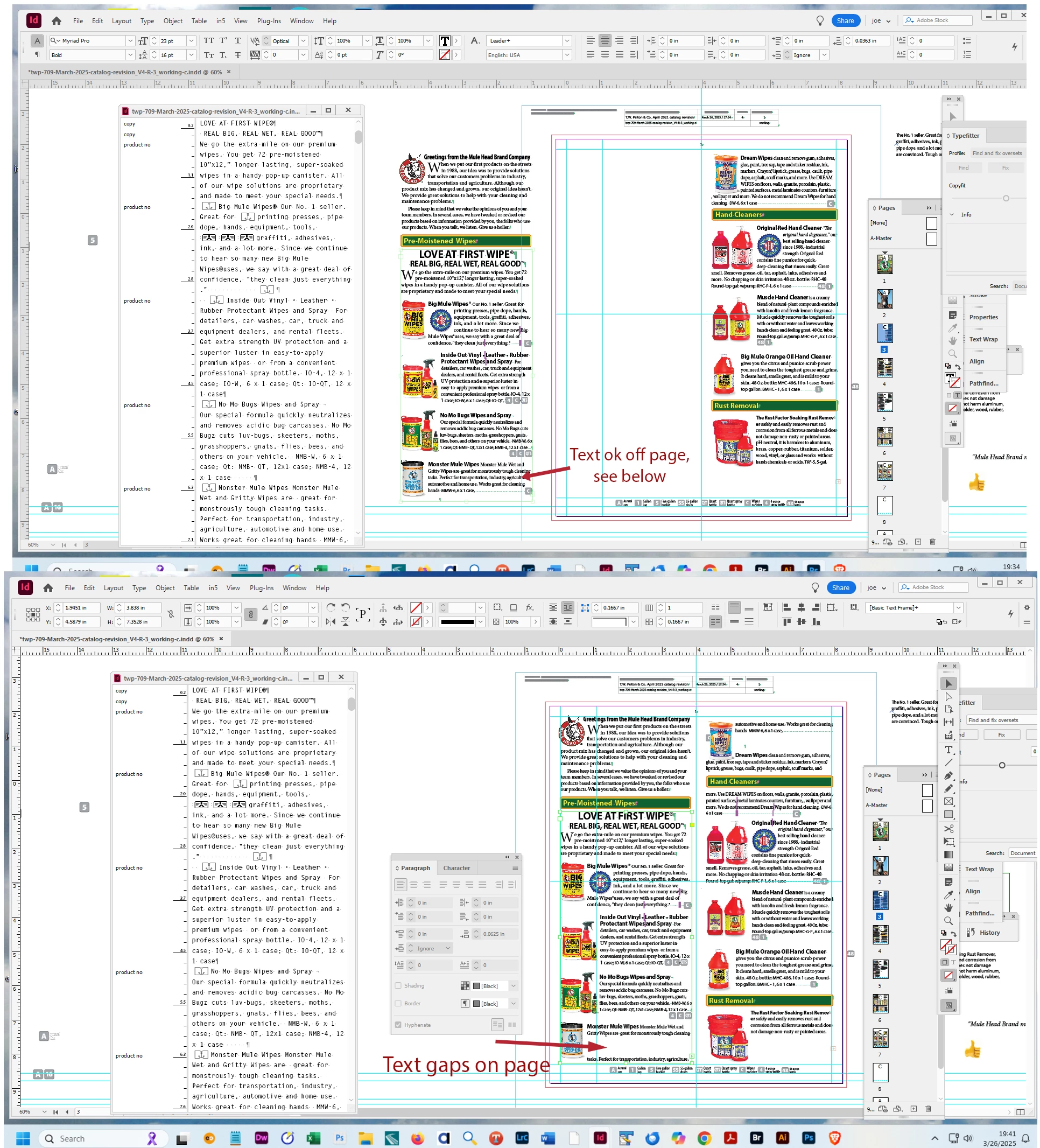
I am working on an eight-page catalog in which a problem cropped up on one of my pages. At the bottom of the the third page a gap is appearing in the text when located on the page. When I pull the text off the page, it aligns perfectly. (see attachnent) I am at my wit's end trying to fix the problem. I have used InDesign since version two and have exhausted all of my knowledge.

Can someone please explain what I have done and how to fix it?

Thanks to those who know more than me,
Joe
 

Correct answer Robert at ID-Tasker

@Joseph374224441v8g


If you turn on Show Frame Edges - you should be able to see more clearly all objects on the Pages.


3 replies

Robert at ID-Tasker
Legend
March 27, 2025

@Joseph374224441v8g


Looking at the top right and bottom right corners of the page - your file might be corrupted - please take a look at this thread: 


https://community.adobe.com/t5/indesign-discussions/layout-elements-appearing-disappearing-at-random/m-p/15233491#M618010 


Robert at ID-Tasker
Robert at ID-TaskerCorrect answer
Legend
March 27, 2025

@Joseph374224441v8g


If you turn on Show Frame Edges - you should be able to see more clearly all objects on the Pages.


Inspiring
March 27, 2025

That did it Robert, I found the guilty party on one of my master pages.

TNX,

Joe

Robert at ID-Tasker
Legend
March 27, 2025
quote

That did it Robert, I found the guilty party on one of my master pages.

TNX,

Joe


By @Joseph374224441v8g


You're welcome. 


Community Expert
March 27, 2025

Is there an object with Text Wrap - either locked or on a layer, even a hidden layer, or a hidden object. 


Pop the file here or in private chat if you want us to take a look 

Hard to tell from your screenshots - my best guess, an object with text wrap that's locked/hidden.

Inspiring
March 27, 2025

Per Robert at ID tasker, I turned on frame edges and found the guilty object on one of my master pages.

TNX,

Joe