Hi @Barathi , Another option is to set the measurement units the script will use:
app.scriptPreferences.measurementUnit = MeasurementUnits.POINTS;
var doc = app.activeDocument;
var frame = doc.pages[0].textFrames[0];
gb= [95.891, 37.5, 730.458, 576];
frame.geometricBounds = gb;
//reset so it doesn’t affect other scripts
app.scriptPreferences.measurementUnit = AutoEnum.AUTO_VALUE;
What I want to do is provide geometric bound values using a panel
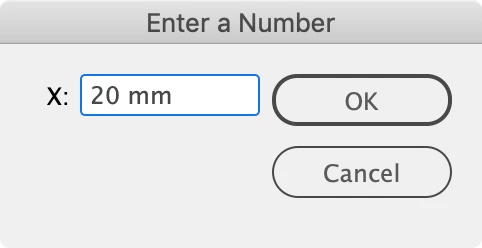
Also, if by panel you mean you are building a dialog, look at the built in dialog class, it has a measurementEditBox object which lets the user specifiy the unit and the returned value is the unit converted to points.
So this would create a number field that defaults to Inches. If I enter 20 mm the returned value is 56.693 points
var x;
makeDialog();
function makeDialog(){
    var theDialog = app.dialogs.add({name:"Enter a Number", canCancel:true});
    with(theDialog.dialogColumns.add()){
        staticTexts.add({staticLabel:"X:"});
    }
    with(theDialog.dialogColumns.add()){
        x = measurementEditboxes.add({editUnits:MeasurementUnits.INCHES, editValue:0, minWidth:90});
    }

    if(theDialog.show() == true){
        x = x.editValue;
        main()
        theDialog.destroy();
	}
}


function main(){
    $.writeln(x)
    //20mm returns 56.693 points
    //10in returns 720 points
}
 AdChoices