Inspiring
December 20, 2018
Question

Get base line value for text "y", "p", "q"

  • December 20, 2018
  • 2 replies
  • 430 views

Hi All,

How to get end base line value for the text "y", "p", "q", "g", "j" present in text frames?

If "a", "b" texts are found the height is not extended. so the baseline value is correct.
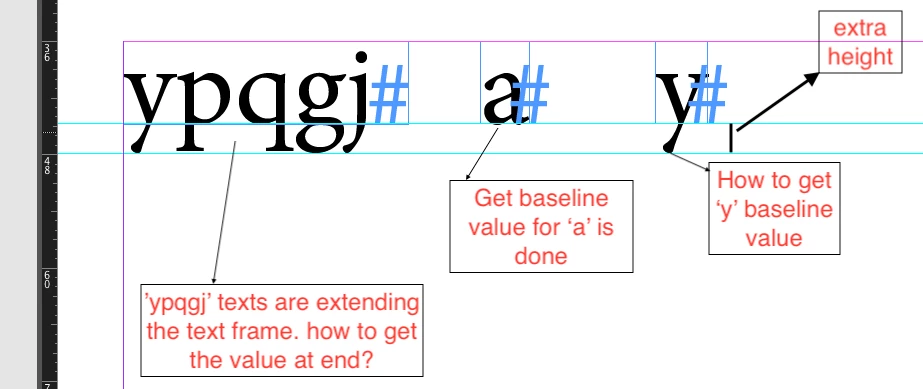
code is,

tell application "Adobe InDesign CC 2017"

    set a to baseline of characters of text frame 1 of active document

end tell

Please give any helps!!

thanks,

John.

This topic has been closed for replies.

2 replies

Peter Kahrel
Community Expert
Community Expert
December 20, 2018

John -- What you refer to as 'baseline' is in fact called 'descender'. Adobe calls it 'descent'. So instead of myCharacter.baseline, use myCharacter.descent.

You wrote that the letter 'a' returns the correct value, but that's not true: the 'a', like the c, d, and a few others, have some so-called undershoot: if you look closely you'll see that the a's two curves (counter and stem) are a bit below the baseline.

P.

Community Expert
December 20, 2018

Hi John,

one idea is to convert the text as a duplicate to outlines and meassure the outlines.

I cannot tell with AppleScript, but with ExtendScript method createOutlines() comes with the option/argument false so the editable text stays in place. You would best test the visible bounds of an outlined character, because it could be scaled and has an outline applied.

WARNING: createOutlines() could change the position of a stroke on the character.

Example "g" where the character is scaled in y-direction to 150% and is shifted with baseline shift 5 Pt.

Outlined as duplicate. You see that the stroke alignment changed from outside center to center:

FWIW: If you come accross automatic numbers and bullets or text variables, text has to be converted first to editable text.

Regards,
Uwe