


Participant
August 10, 2017
Answered

Get filepath of linked object

  • August 10, 2017
  • 1 reply
  • 2337 views

How can I get the file path from the selected object in Adobe Indesign? (InDesign CS5 (7.0) Object Model)

I need the Path property from the Link Info in a string variable so I can open the linked file for editing.
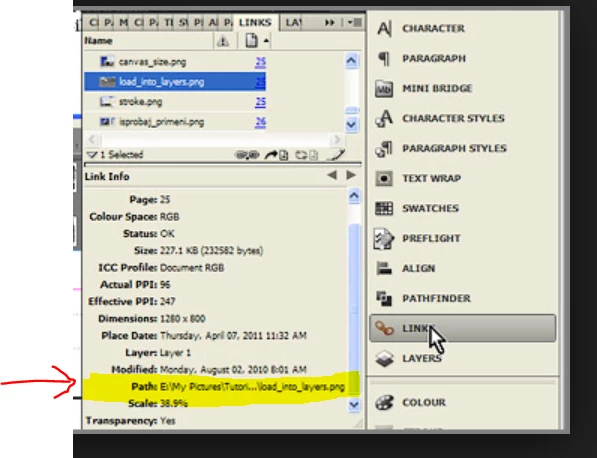
I tried some things, none of them worked:

     var myObj = app.selection[0];
     myFilePath
= myObj.filePath;
or
     myFilePath
= myObj.itemLink.assetURL;

then somebody suggested (also not working)

          myFilePath = myObj.itemLink.filePath;

Thank you very much for your help!

Kind regards,

Stefan

This topic has been closed for replies.
Correct answer Laubender

Hi Stefan,

what exactly is selected in your tests?
The container frame holding the image or the image itself?

If you selected the graphic frame holding the image you'll get the path this way:

app.selection[0].graphics[0].itemLink.filePath;

Regards,
Uwe

1 reply

LaubenderCommunity ExpertCorrect answer
Community Expert
August 10, 2017

Hi Stefan,

what exactly is selected in your tests?
The container frame holding the image or the image itself?

If you selected the graphic frame holding the image you'll get the path this way:

app.selection[0].graphics[0].itemLink.filePath;

Regards,
Uwe

Participant
August 23, 2017

Dear Uwe, thanks a heap. This is exactely what I was looking for and it works. Where would you look that up if you didn't already know it? I checked the manual at Adobe InDesign CS5 (7.0) Object Model JS: Table of Contents but even now when I know the answer I am not able to "trace" your answer in the manual. Thanks again.

Community Expert
August 23, 2017

Hi Stefan,

a lot of experience that came out of a lot of testing plus some very good resources like this by Jongware:

Indesign JavaScript Help

And: Regular reading, debating and commenting on this forum over the years :-)

Regards,
Uwe