
Known Participant
February 20, 2022
Answered

Get IHyperlink from IIDXMLElement

  • February 20, 2022
  • 2 replies
  • 686 views

Hi,


I have a very simple test document with only one hyperlink.
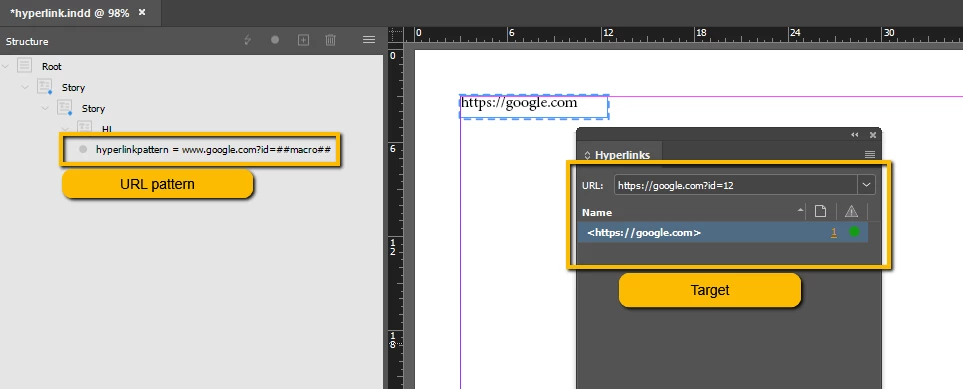

I tried to to get IHyperlink via IHyperlinkSource but I got always NULL value for QueryHyperlinkSourceAt function.
textValue is correct so I think the dataModel and range.Start() parameter is right for QueryHyperlinkSourceAt function.

To get hyperlinks by IHyperlinktable is not solution for me because I would like to change the destination URL by en XML attribute "hyperlinkpattern" so I need to get IHyperlink via IIDXMLElement.


My code:

XMLReference xmlref = iter->first;
InterfacePtr<IIDXMLElement> elem(xmlref.Instantiate());
WideString elemName = elem->GetTagString();
WideString hyperlinkPattern = elem->GetAttributeValue(WideString("hyperlinkpattern"));

do {
	XMLContentIterator iter(elem->begin());
	InDesign::TextRange range = *iter;

	if (!range.IsValid()) {
		break;
	}

	InterfacePtr<ITextModel> textModel(range.QueryModel());
	if (!textModel) {
		break;
	}

	WideString textValue("");
	TextIterator begin_(textModel, range.Start());
	TextIterator end_(textModel, range.End());
	for (TextIterator iterText = begin_; iterText != end_; iterText++) {
		const UTF32TextChar characterCode = *iterText;
		textValue.Append(characterCode);
	}

	InterfacePtr<IHyperlinkSource> hyperlinkSource(static_cast<IHyperlinkSource*>(Utils<IHyperlinkUtils>()->QueryHyperlinkSourceAt(textModel, range.Start())));
	if (!hyperlinkSource)   // <------------------ hyperlinkSource ALWAYS NULL
		break;
	InterfacePtr<IHyperlink> hyperlink(db, hyperlinkSource->GetOwningHyperlink(), IID_IHYPERLINK);

	InterfacePtr<IHyperlinkDestination> hyperlinkDestination(db, hyperlink->GetDestinationUID(), IID_IHYPERLINKDESTINATION);
	hyperlinkDestination->SetName(PMString("https://adobe.com")); // Redirect URL to adobe 
} while (kFalse);


I appreciate any help.

Thx
Karoly

This topic has been closed for replies.
Correct answer Manan Joshi

The following seems to work. Lot of work to find this(terse documentation to bless). This gives the idea, you can see if you get a more concise way of doing it. I have harcoded the query path for XMLElement, you can plug it with your code. One interesting thing is that even though the name is changed, it's not reflected on the hyperlinks panel even though querying it gives the chaged name.

            InterfacePtr<IIDXMLElement> rootXMLElement(Utils<IXMLUtils>()->QueryRootElement(Utils<ILayoutUIUtils>()->GetFrontDocument()));
            ASSERT(rootXMLElement);
            if(!rootXMLElement)
                break;
        
            IIDXMLElement *elem = rootXMLElement->GetNthChild(0).Instantiate()->GetNthChild(0).Instantiate()->GetNthChild(0).Instantiate();
            do {
                XMLContentIterator iter(elem->begin());
                InDesign::TextRange range = *iter;
                if (!range.IsValid()) {
                    break;
                }
                InterfacePtr<ITextModel> textModel(range.QueryModel());
                if (!textModel) {
                    break;
                }
                
                InterfacePtr<IFrameList> iFrameList(textModel->QueryFrameList());
                if(!iFrameList)
                    break;
                
                InterfacePtr<ITextFrameColumn> iTextFrameColumn(iFrameList->QueryNthFrame(0));
                if(!iTextFrameColumn)
                    break;
                
                InterfacePtr<IMultiColumnTextFrame> iMultiColumnTextFrame(iTextFrameColumn->QueryMultiColumnTextFrame());
                if(!iMultiColumnTextFrame)
                    break;
                
                InterfacePtr<IHierarchy> iHierarchy(iMultiColumnTextFrame, UseDefaultIID());
                if(!iHierarchy)
                    break;
                
                InterfacePtr<IHyperlinkPageItemData> iHyperlinkPageItemData(iHierarchy->QueryParent(), UseDefaultIID());
                if(!iHyperlinkPageItemData)
                    break;
                
                InterfacePtr<IHyperlinkSource> iHyperlinkSource(::GetDataBase(iHierarchy), iHyperlinkPageItemData->GetSource(), UseDefaultIID());
                if(!iHyperlinkSource)
                    break;
                
                InterfacePtr<IHyperlink> iHyperlink(::GetDataBase(iHierarchy), iHyperlinkSource->GetOwningHyperlink(), UseDefaultIID());
                if(!iHyperlinkSource)
                    break;
                
                InterfacePtr<IHyperlinkDestination> hyperlinkDestination(::GetDataBase(iHierarchy), iHyperlink->GetDestinationUID(), UseDefaultIID());
                PMString name;
                hyperlinkDestination->GetName(&name);
                CAlert::InformationAlert(name);
                hyperlinkDestination->SetName(PMString("https://adobe.com")); // Redirect URL to adobe

 -Manan

2 replies

Manan JoshiCommunity ExpertCorrect answer
Community Expert
February 21, 2022

The following seems to work. Lot of work to find this(terse documentation to bless). This gives the idea, you can see if you get a more concise way of doing it. I have harcoded the query path for XMLElement, you can plug it with your code. One interesting thing is that even though the name is changed, it's not reflected on the hyperlinks panel even though querying it gives the chaged name.

            InterfacePtr<IIDXMLElement> rootXMLElement(Utils<IXMLUtils>()->QueryRootElement(Utils<ILayoutUIUtils>()->GetFrontDocument()));
            ASSERT(rootXMLElement);
            if(!rootXMLElement)
                break;
        
            IIDXMLElement *elem = rootXMLElement->GetNthChild(0).Instantiate()->GetNthChild(0).Instantiate()->GetNthChild(0).Instantiate();
            do {
                XMLContentIterator iter(elem->begin());
                InDesign::TextRange range = *iter;
                if (!range.IsValid()) {
                    break;
                }
                InterfacePtr<ITextModel> textModel(range.QueryModel());
                if (!textModel) {
                    break;
                }
                
                InterfacePtr<IFrameList> iFrameList(textModel->QueryFrameList());
                if(!iFrameList)
                    break;
                
                InterfacePtr<ITextFrameColumn> iTextFrameColumn(iFrameList->QueryNthFrame(0));
                if(!iTextFrameColumn)
                    break;
                
                InterfacePtr<IMultiColumnTextFrame> iMultiColumnTextFrame(iTextFrameColumn->QueryMultiColumnTextFrame());
                if(!iMultiColumnTextFrame)
                    break;
                
                InterfacePtr<IHierarchy> iHierarchy(iMultiColumnTextFrame, UseDefaultIID());
                if(!iHierarchy)
                    break;
                
                InterfacePtr<IHyperlinkPageItemData> iHyperlinkPageItemData(iHierarchy->QueryParent(), UseDefaultIID());
                if(!iHyperlinkPageItemData)
                    break;
                
                InterfacePtr<IHyperlinkSource> iHyperlinkSource(::GetDataBase(iHierarchy), iHyperlinkPageItemData->GetSource(), UseDefaultIID());
                if(!iHyperlinkSource)
                    break;
                
                InterfacePtr<IHyperlink> iHyperlink(::GetDataBase(iHierarchy), iHyperlinkSource->GetOwningHyperlink(), UseDefaultIID());
                if(!iHyperlinkSource)
                    break;
                
                InterfacePtr<IHyperlinkDestination> hyperlinkDestination(::GetDataBase(iHierarchy), iHyperlink->GetDestinationUID(), UseDefaultIID());
                PMString name;
                hyperlinkDestination->GetName(&name);
                CAlert::InformationAlert(name);
                hyperlinkDestination->SetName(PMString("https://adobe.com")); // Redirect URL to adobe

 -Manan

-Manan
c4kaciAuthor
Known Participant
February 21, 2022

Great job!
Thank you!

/Karoly

Community Expert
February 21, 2022

Hi Karoly,

Looking at your document I see that you have hyperlink on the textframe and not on the text inside it and hence the code fails. If you select the text inside the box and then apply hyperlink to it then hopefully it will work

-Manan

-Manan
c4kaciAuthor
Known Participant
February 21, 2022

Hi Manan,


Thank you for your quick answer.

I will try it and let you know .

/Karoly