


January 14, 2026
Answered

Get rid of automatic double angle brackets in text box

  • January 14, 2026
  • 2 replies
  • 78 views

hey! 
Every time I open my indesign to start writing a text, it automatically places two double angle brackets at the beginning of each sentence. How do I get rid of those? 

Thank you so much!
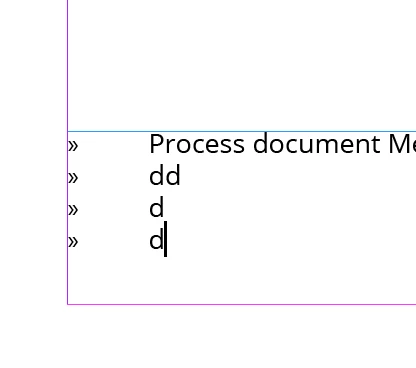
Screenshot 2026-01-14 at 11.45.49.png

Correct answer Eugene Tyson

It sounds like a bullet or paragraph style is being applied by default.

In InDesign, whatever formatting is active with the Text tool becomes the default for new text frames.


Try this

Make sure nothing is selected on the page (click on the pasteboard).

Select the Type tool.

In the Paragraph panel, turn Bullets off (and check numbering too).

Open the Paragraph Styles panel and make sure you’re not automatically typing into a style that includes those double angle brackets.


Once you clear the formatting with nothing selected, it should stop inserting them automatically.


2 replies

Eugene TysonCommunity ExpertCorrect answer
Community Expert
January 14, 2026

It sounds like a bullet or paragraph style is being applied by default.

In InDesign, whatever formatting is active with the Text tool becomes the default for new text frames.


Try this

Make sure nothing is selected on the page (click on the pasteboard).

Select the Type tool.

In the Paragraph panel, turn Bullets off (and check numbering too).

Open the Paragraph Styles panel and make sure you’re not automatically typing into a style that includes those double angle brackets.


Once you clear the formatting with nothing selected, it should stop inserting them automatically.


FRIdNGE
January 14, 2026

Para Style option: "Bullets and Numbering" setting with "Text After" value =  "^t".


(^/)  The Jedi