Participant
April 5, 2019
Answered

Getting a drop shadow to sit on top of other objects?

  • April 5, 2019
  • 3 replies
  • 994 views

Hi all, first timer here and complete ID novice! All I know so far has been self-taught using about 50 YouTube tutorials

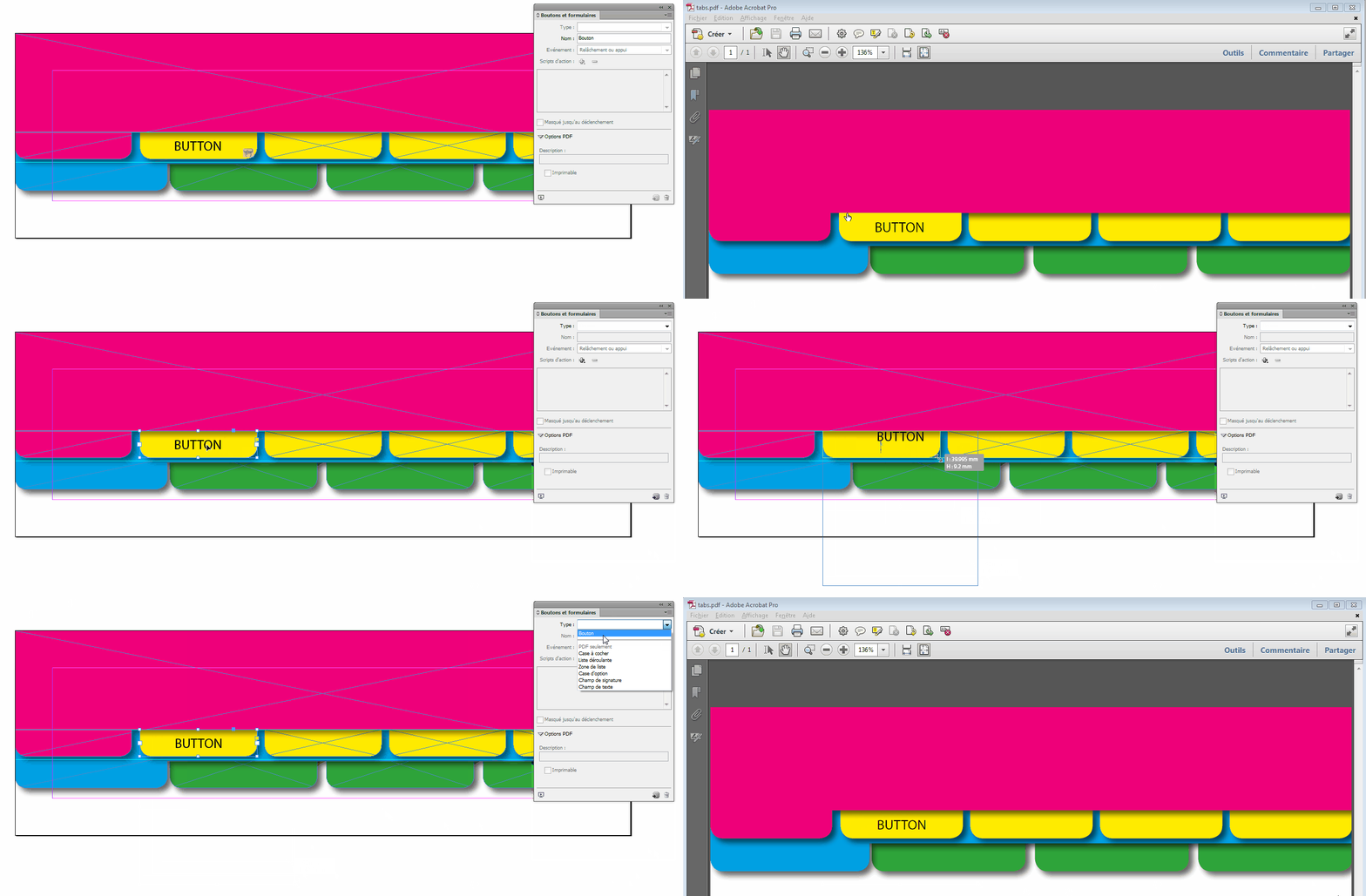
I'm trying to design a workbook with linked tabs running along the bottom, and would like the active tab to look like it's part of a page sitting on top of the other tabs so I'm trying to apply drop shadows to this - I've combined the tab shape with a larger rectangle running the full width of the page to give the effect of a page.

In ID this looks fine and exactly as I want it to - Picture 1

When I export to interactive PDF the drop shadow sits UNDER the other tabs - Picture 2 (ignore the errors, I've got loads of work left to do on it!)

Why is this happening? It's driving me loony and my extremely limited knowledge of ID is now frustrating me.

Any help would be awesome!

This topic has been closed for replies.
Correct answer vinny38

Yeah buttons are always sent to front...

What about designing the tabs without any text in them, create independent text frames and turn them (no fill) into buttons?

Just like you did with your "Introduction" tab:

3 replies

vinny38
vinny38Correct answer
Legend
April 8, 2019

Yeah buttons are always sent to front...

What about designing the tabs without any text in them, create independent text frames and turn them (no fill) into buttons?

Just like you did with your "Introduction" tab:

Community Expert
April 8, 2019

vinny38  wrote

…What about designing the tabs without any text in them, create independent text frames and turn them (no fill) into buttons?…

Hi Vinny,

hm. Yes. Thought, this was already the case.

Regards,
Uwe

vinny38
Legend
April 8, 2019

Hi Uwe

Well, if you look closely at the position of the button icon, you can see it's not applied to the text frame but to the tab itself ^^

JonathanArias
Legend
April 5, 2019

this is normal. interactive .pdf will never work perfect, you can design in adobe indesign and it will not look 100% on acrobat. also, none of this will work on the ipad.

Community Expert
April 5, 2019

Hi Jonathan,

some button actions should work.

Depending on the PDF Viewer App on the iPad.

Regards,
Uwe

Community Expert
April 5, 2019

Hi carriew15608919 ,

could be a bug with export to Interactive PDF.

Will that also happen if you export to Print PDF?

For that try e.g. PDF/X-4.

If not there is a chance to have both:
Interactivity from the one PDF with the wrong shadow effect.

All things not interactive from the PDF/X-4.

To do that you need Acrobat Pro DC.

1. Open the Interactive PDF.

2. Replace all pages with the pages of the PDF/X-4 PDF.

Interactivity will stay put. Save to a new file name.

Regards,
Uwe

Participant
April 8, 2019

Hi Laubender, thanks for the reply.

It works perfectly if I export as a print PDF but I lose the interactive elements, and when I try the replace pages trick the drop shadow disappears under again.

Grrr!!

It's this document I'm basing my design on and the drop shadow sits on top in this one so I figured it must be possible! So frustrating.

https://assets.publishing.service.gov.uk/government/uploads/system/uploads/attachment_data/file/365697/Strategy_developm…

Thanks for your help though, I appreciate it.

Community Expert
April 8, 2019

carriew15608919 …It works perfectly if I export as a print PDF but I lose the interactive elements, and when I try the replace pages trick the drop shadow disappears under again.

Why is that?

Open the interactive PDF first and then replace the pages with the PDF/X-4.

Regards,
Uwe