
cathyy9634618
Participant
July 16, 2022
Answered

Give text blocks a different width depending on the phrase?

  • July 16, 2022
  • 1 reply
  • 115 views

Hello dear community,


It's the first timeI post,ever.


I have to do an exercise to get a job, and it has to be done in InDesign. I am more of an Illustrator and Photoshop gal so I need help.


Here's a screen capture of what I need to do (the arrow shows what I am talking about).
The white box under the text has a different width according to the text.... How to do this? It's driving me NUTS.


Thank you so much!!!!!


Cathy


You need to ask program questions in the forum for the program you are using
To ask in the forum for your program please start at https://community.adobe.com/
Moving from Using the Community (which is about the forums) to the correct forum... Mod
This topic has been closed for replies.
Correct answer Laubender

Hi Cathy,

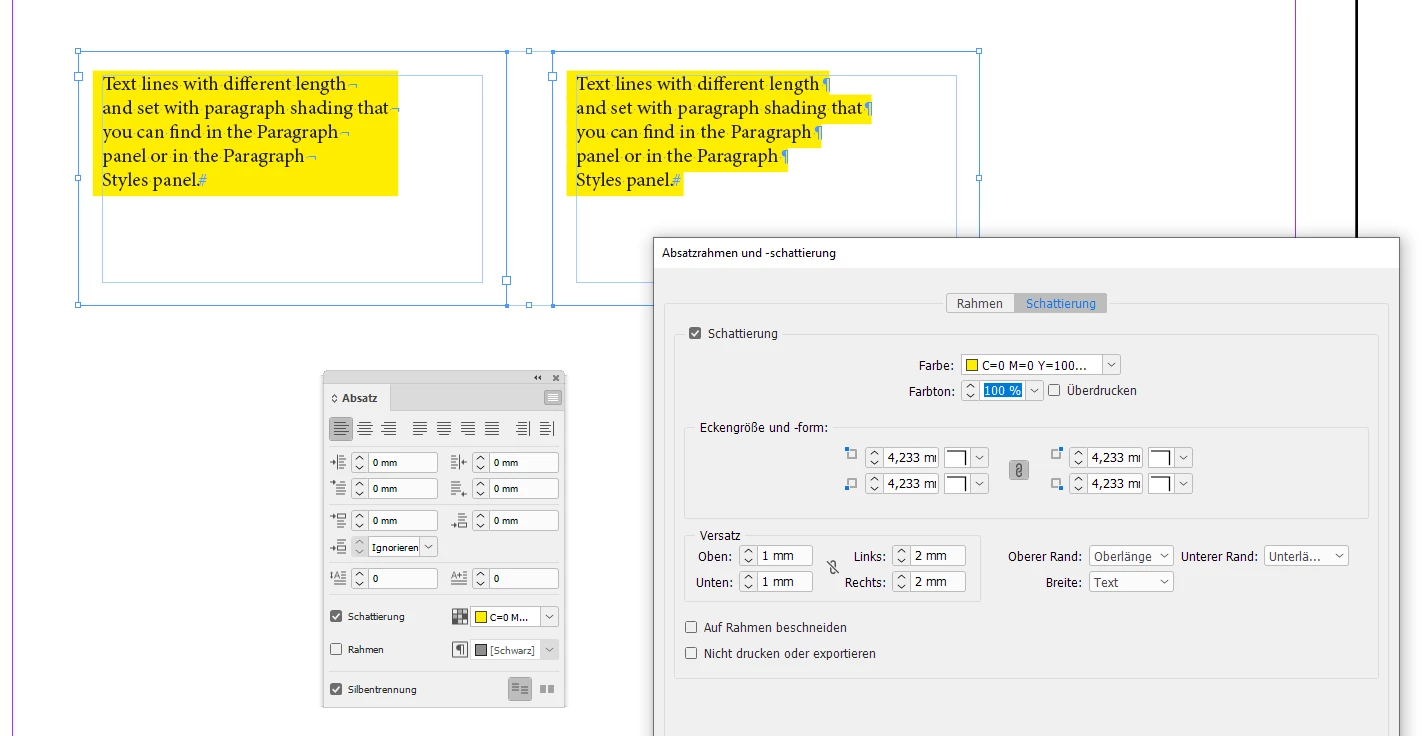
if you are using the feature paragraph shading for this, make every line of text its own paragraph.

Set the width of the shading to the width of the text with some offset.

From my German InDesign where its forced line breaks vs one paragraph per line:


Regards,
Uwe Laubender
( Adobe Community Professional )

1 reply

LaubenderCommunity ExpertCorrect answer
Community Expert
July 16, 2022

Hi Cathy,

if you are using the feature paragraph shading for this, make every line of text its own paragraph.

Set the width of the shading to the width of the text with some offset.

From my German InDesign where its forced line breaks vs one paragraph per line:


Regards,
Uwe Laubender
( Adobe Community Professional )