
Known Participant
July 6, 2023
Question

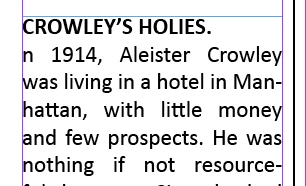
Glitch while pasting text from Mac into two column frame layout, the letter "I" disappears

  • July 6, 2023
  • 2 replies
  • 901 views

The weirdest InDesign glitch I've ever encountered.  I'm laying out a book with text pasted from Mac Pages  into frames in a two-column layout. I'm receiving various texts that have to be arranged alphabetically, so I can't place files. Anyhow, everything is fine BUT when an entry starts with a word beginning with a capital "I"...the letter I drops out or disappears. It only happens with that letter. The body text is nothing odd, just Calibri. I'm using the latest version of ID for Mac. Here's a screenshot.
 

<Title renamed by moderator>

This topic has been closed for replies.

2 replies

rob day
Community Expert
Community Expert
July 6, 2023

Hi @Conquest , You probably could get that to happen via a Paragraph Style’s Grep Style. Does it happen if you a apply a different style or no style?

ConquestAuthor
Known Participant
July 6, 2023

Rob, I have no GREP styles.

rob day
Community Expert
Community Expert
July 6, 2023

Can you share the Pages file and the ID doc—you can attach them to a reply

Community Expert
July 6, 2023

If you pasted text from Mac Pages into a text editor, then copy paste into Indesign, does the issue still happen?

ConquestAuthor
Known Participant
July 6, 2023

I haven't tried that. Although that may cause other problems, such as losing italics.  Do you think the source of the problem is Pages?

Community Expert
July 6, 2023

I would try exporting RTF from Pages, and importing into Indesign, this should retain formatting.