Inspiring
Jul 15, 2025 7:12 AM UTC
Question

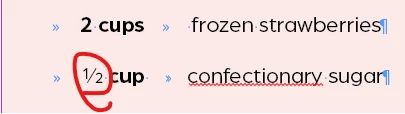
glyph not behaving with paragraph styles

why when I put in a glyph does it not bold properly as per the paragraph style?
 

2 replies

Abhishek Rao
Community Manager
Community Manager
Jul 15, 2025 9:36 AM UTC

Hi @hendy_5450,


Thanks for sharing the screenshot. This usually happens because some glyphs, like fractions, are designed in a way that they do not pick up bold or italic styling even when the paragraph style is set. Even though your paragraph style is set to bold, the font might not have a bold variant of that specific glyph, so it stays in its default weight.

Could you confirm which font, InDesign version, and OS you are using? Also, let me know if this happens with other fonts too.

If possible, please share a short screen recording showing how you are applying the style and inserting the glyph.


Looking forward to your update!

Abhishek

Translate
Willi Adelberger
Community Expert
Community Expert
Jul 15, 2025 7:25 AM UTC

Is it from the same style and font? If so as it is designed.

Translate
