
Glyphs dissapear when placing .EPS files into my InDesign document
Hello guys,
i have a very annoying problem with my .eps files (math equations exported from Word document with Mathtype) on my Mac studio M2 (running Sonnoma 14.3.1). If i import them into InDesign document or open those .eps files in Illustrator symbol/glyphs disappear.
I have tried same process (Word -> MathType export to eps -> place eps files into Indesign document) on my coworkers PC and they show up fine, BUT when i opened them in illustrator where glyph is suppose to be i get the X mark for missing glyph.
Screenshot from PC, the one with link not missing (eps was untouched just placed into InDesign). You can also see the one eps (that one has been opened in illustrator) below is missing symbol for multiply.
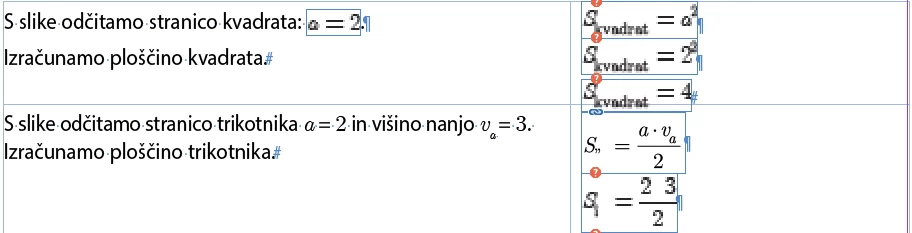
Screenshot what happens if i open it in illustrator on PC (on Mac there is just empty space)
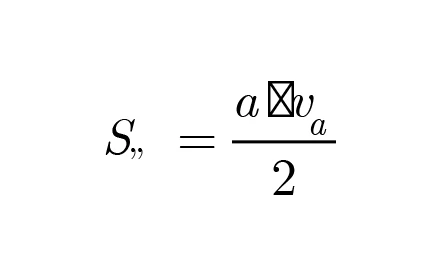
If i cant open them in illustrator to edit them that i can live with since i can edit in Word and then export, but if i don't touch them after export and just place them into InDesign on my Mac and symbols/glyphs disappear that is a big problem, since this means i have to edit them in illustrator 1 by 1 and type the glyphs by hand again.
Did anyone have a similar problem or have an idea how to solve this issue. I am attaching one .eps file if you have the same problem as me.
Any help or advice would be really appriciated. Thank you in advance!


 AdChoices