
Known Participant
August 5, 2019
Answered

GPU Acceleration in InDesign

  • August 5, 2019
  • 3 replies
  • 1637 views

Hi,

I work on a MacBookPro 15" 2017 with 4GB VRAM.

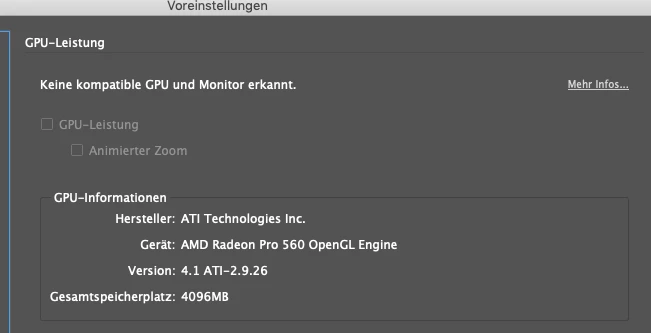
Without any screen connected my dynamic zoom in InDesign just works fine. Now when I connect my new screen (Super Ultra Wide Samsung) the option is disabled.

How can I enable it again? Because its the same powerful MacBook, nothing changed, only the display.

I connected it with HDMI, not Displayport for more Power. Could this be the "fix"? That HDMI cant transfer enough data?

I dont have the adapter to test it.

Is there a workaround to enable dynamic zoom in InDesign if im "not allowed" to do it?

Thank you.
This topic has been closed for replies.
Correct answer footprint DESIGN & PRINT

Hi @jonalange.de,

I would assume that when you are using your external display you have the built in display closed?

One of the requirements for GPU acceleration is a Retina/HiDpi display, when your built in display (Retina) is closed and you are just using the external display, it is not using a Retina/HiDpi display and so you lose GPU acceleration.

I know, I think it is stupid that the resolution of a display would affect if you have GPU acceleration when the GPU you have supports it...

Try plugging in your external display and using it as an additional display, keep your MacBook Pro lid open, then launch InDesign.

a. you will have more screen to use, always nice.

b. you will have a Retina/HiDpi display attached and you will have GPU acceleration even if you move the InDesign window onto the larger external display.

I think that might solve your issue.

3 replies

Participant
September 30, 2020

I'm not sure why the detection was done this way...as others noted it doesn't make sense. I have a Mac Pro with an RX 580, but no HiDPI display so I'm locked out of Indesign's GPU acceleration despite having more than enough capability. 


For anyone looking, there is a workaround that I haven't seen mentioned. 

1. Enable HiDPI mode

2. Use SwitchResX to setup a custom scaled resolution

3. Switch to the new resolution with SwitchResX and launch Indesign, select GPU acceleration.


You can switch back to your normal resolution while Indesign is running if you don't want to push the extra pixels, you'll get a little performance boost and the GPU setting should stick until you restart Indesign. But you'll need to switch to the custom resolution each time you launch Indesign if you want GPU setting back.

footprint DESIGN & PRINT
Inspiring
August 7, 2019

I agree, it's stupid that it has to work this way.

At home I use a 2013 MacBook Pro with Retina display, it has a 1gb Nvidia GT650m gnu and I get hardware GPU acceleration, awesome!

At work I use a Mac Pro with Dual 2gb Fire Pro D300 GPUs, way more capable than in my laptop, but, no GPU acceleration because the two displays are not Retina/HiDpi.

footprint DESIGN & PRINT
Inspiring
August 6, 2019

Hi @jonalange.de,

I would assume that when you are using your external display you have the built in display closed?

One of the requirements for GPU acceleration is a Retina/HiDpi display, when your built in display (Retina) is closed and you are just using the external display, it is not using a Retina/HiDpi display and so you lose GPU acceleration.

I know, I think it is stupid that the resolution of a display would affect if you have GPU acceleration when the GPU you have supports it...

Try plugging in your external display and using it as an additional display, keep your MacBook Pro lid open, then launch InDesign.

a. you will have more screen to use, always nice.

b. you will have a Retina/HiDpi display attached and you will have GPU acceleration even if you move the InDesign window onto the larger external display.

I think that might solve your issue.

Known Participant
August 6, 2019

Thank you very much. It worked for me. But its insanely stupid. Why the hell. I think this should get "fixed" if its not intended. Now my Mac is just slower because it has to push so many pixels... 2880x1800 Retina and 3840x1080 external...