


Inspiring
August 14, 2026
해결됨

Gradients with transparency effects not displaying when exported

  • August 14, 2026
  • 7 답변들
  • 38 조회

The image on the left has 2 panels of gradient with a multiply effect in InDesign the image on the right is how it exports to PDF.

I’ve had this issue constantly for weeks, along with other issues that Adobe just won’t fix it’s getting to be a nightmare to use this crappy software.

I’ve tried every different PDF export option and compatibility setting there is it doesn’t help. With the exception that sometimes but not always, interactive PDF rarely fixes the issue.

I’ve changed the colour profiles too but doesn’t help.

It’s to the point where I can’t work using CC so will need to change my whole company over to Affinity if they don’t start fixing some of these bugs.

I’m still having this issue here that Adobe can’t fix, not sure it they are related.


    최고의 답변: richardl28109603

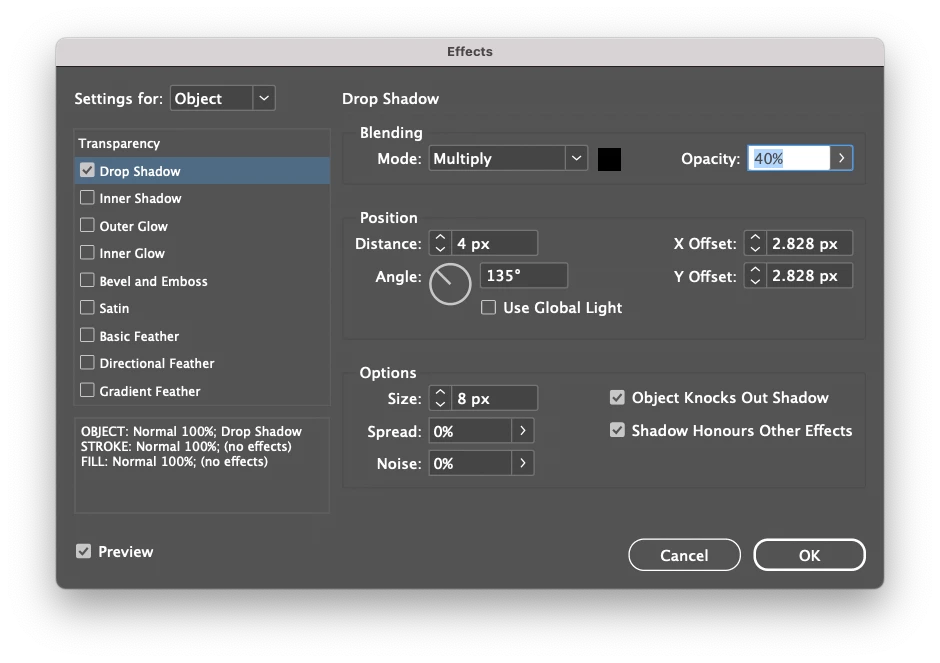
    A colleague found a solution. The presentation I was placing the indesign files into had a drop shadow on them. I needed to check the box saying ‘Shadow Honours Other Effects’

    Not sure why, but it worked.  

    7 답변

    richardl28109603작성자답변
    Inspiring
    August 14, 2026

    A colleague found a solution. The presentation I was placing the indesign files into had a drop shadow on them. I needed to check the box saying ‘Shadow Honours Other Effects’

    Not sure why, but it worked.  

    leo.r
    Community Expert
    Community Expert
    August 14, 2026

    Regarding your second issue:
     

    I’m still having this issue here that Adobe can’t fix, not sure it they are related.


    Did you disable Save in Background in Illustrator preferences and then resave your files?

    rob day
    Community Expert
    Community Expert
    August 14, 2026

    What are your PDF Export settings? Does it happen if you Export with the default PDF/X-4 preset

    BobLevine
    Community Expert
    Community Expert
    August 14, 2026

    Is that an Acrobat screenshot? Can you post the files for us to look at?

    Inspiring
    August 14, 2026

    Left is Indesign, right is indeed Acrobat

    Unfortunately I can’t post the files due to confidentiality and licence issues.

    I managed to find a work around, by placing exported pdfs in to indesign, instead of live InDesign files, but I should have to do this as it slows down the editability and makes packaging files difficult.  

    leo.r
    Community Expert
    Community Expert
    August 14, 2026

    I managed to find a work around, by placing exported pdfs in to indesign, instead of live InDesign files, but I should have to do this as it slows down the editability and makes packaging files difficult.  


    I don’t understand this sentence, sorry. Do you mean that the same PDFs that appear wrongfully in Acrobat do appear correctly when you place them in InDesign? And what is that in this process that makes packaging difficult?