Participant
November 11, 2020
Answered

Grainy text when printing small text from indesign

  • November 11, 2020
  • 2 replies
  • 698 views

Hi, 


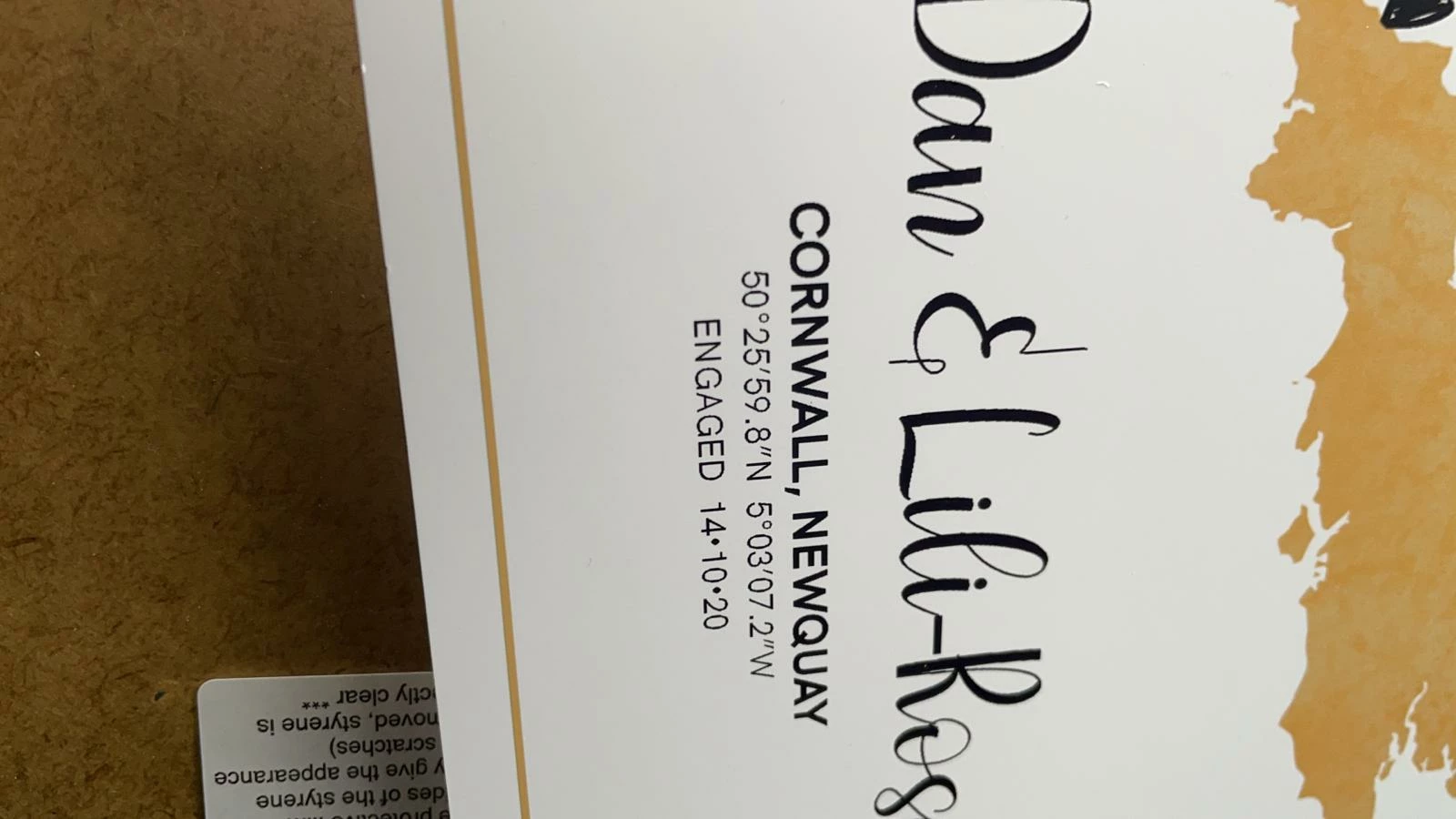
I'm having a problem. When printing small fonts my Canon Pro-100 doens't cope with it very well and its incredibly frustrating. Does anyone have any idea why this is happening?
This topic has been closed for replies.
Correct answer Randy Hagan

Thanks a lot for your detailed answer. I'm going to give changing the values a try and see how that works out.


One thing that I can't get my head around is if I print it straight from indesign it looks fine. It's the exporting to PDF where you can see the black doesn't look good (even before printing). Is this something that can be fixed in my PDF Export/InDesign settings. 


It can, but to be honest it'll be a lot easier to just dial in the rich black if you're otherwise happy with what you're getting from printing PDFs now.


But if you really want to poke under the hood and custom-tailor your PDF profile presets, you can learn more about how to do that through this link, then exploring other links from that help page.


Good luck,


Randy


2 replies

Randy Hagan
Community Expert
Community Expert
November 11, 2020

You're really showing the worst-case scenario for a wide range of photo printers. It's cold comfort, but you're not alone finding this to be the case.


Photo printers are designed to reproduce photos with great fidelity. Black ink on no background is not what they're designed to do, and not what they'll reproduce well. You may not get much better results. Your small sans serif type does look pretty rough, but truth be told edge definition on the larger script is pretty jaggy too. Inkjet offers capabilities for paper bleed that should soften the edges, but when you're printing on shiny photo stock, the coated substrate doesn't allow for much dot gain/bleed to soften the rough edges.


To illustrate the point, take an image with a large area of light to medium color. Place your black type on that light to medium area of your image and print that. You may (should) see that your type reproduction is not as ragged/rough when you put color behind it. I'll bet you a nickel that you'll see some difference, if not great difference, when you do that. Then, if you have it handy, use some heavier-weight copy paper stock, like a 24-28lb, 88-96 brightness uncoated weight stock. When you run that through your photo printer, I'll bet you get better results too.


The best thing I can suggest to you is to design your way around the issue. When I've encountered these kind of issues, I redesign the output to place light colored type on a contrasting dark background field, or vice-versa, to get myself past the problem. Rather than keep butting my head up against the problem, I design with workarounds to minimize the limitations. It may not be what I — or you — really want to do. But it works.


I wish I had better news for you, but frankly I'd have to lie to you to provide it. To a significant degree, you're built to lose here.


Randy


Participant
November 11, 2020

Hi Randy,


Thanks for the reply I thought that might be the case. (that photo printers aren't meant to be for this type of printing) I have found one 'kind of' fix... I exported it as a High quality pdf and it is significantly better, not 100% but much much better.


The reason I havent been printing from PDFs before is because I done it with another file and the black just wasn't black enough it was more an an extremely dark grey. Maybe I need to solve the grey problem with PDFs first and then this one wont be such a big one!

Randy Hagan
Community Expert
Community Expert
November 11, 2020

Since you're working with a color inkjet, I'd suggest that maybe you need to generate a Rich Black for your text.


Try working with a build of C-25, M-20, Y-20 and K-100 for generating your "Black" build. That should get you deeper blacks out of your PDF output. But realize that if your inkjet printer's registration is off by even the littlest bit, using this Rich Black color build will rat you out on the spot.


Hope this helps,


Randy

Participant
November 11, 2020

(It looks a lot worse in real life too)