



dublove
Legend
December 20, 2024
Question

Great people: please come and study how to avoid duplicate catalog extraction

  • December 20, 2024
  • 2 replies
  • 1138 views

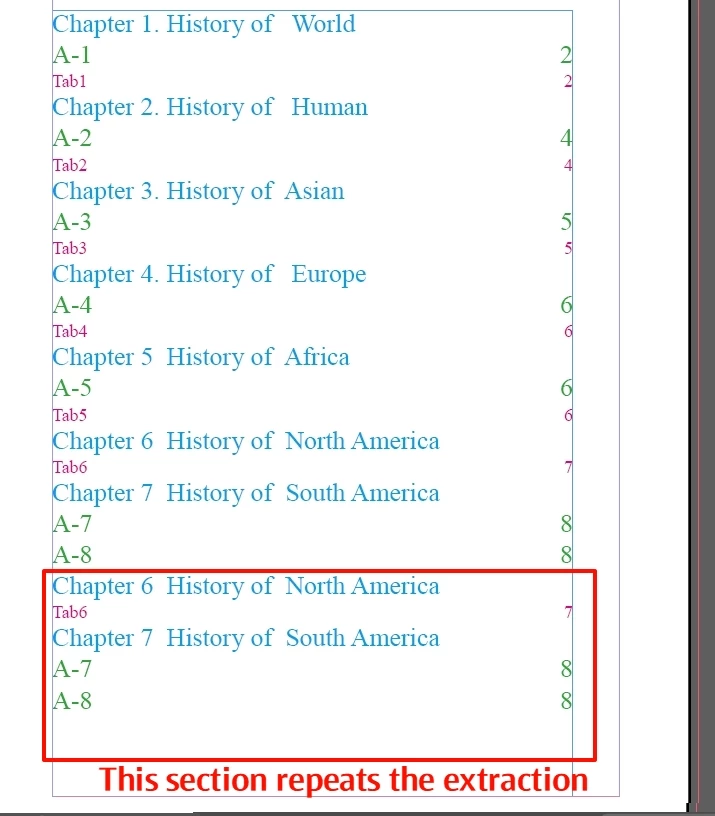
Last time I found catalog duplicates being extracted.
The main reason for this was that some of the tables themselves did not span a page, they were only on one page, but the “Skip Header Rows” was used.

In this case the table of contents at the back was wrong.


If there are very few tables, I can remove the “Skip Header Rows” for those tables that do not span pages.
However, there are a lot of tables that need “Skip Header Rows” at the beginning, and after the client rewrites them, these tables do not need this feature because there are a lot of them, and it is difficult to recognize the cancellation.


In short, if there are hundreds of tables, you will go crazy, the catalog is all wrong.
Please research if there is a simple and workable solution for this.


Thanks
 

This topic has been closed for replies.

2 replies

Dave Creamer of IDEAS
Community Expert
Community Expert
December 20, 2024

You file has some corruption. Save it as IDML and reopen. The dupe TOC items do not appear.


A few notes...

  1. Not quite sure understand what you are asking about the skip table headers. You appear to be using the feature correctly (applying the Cell style to the first body row to make it look like a header). Don't worry about applying the setting to tables that don't span but use the first body row cell style consistantly for later updates. 
  2. Your paragraph style settings are not done well. I did not check your other style settings.
  3.  "Asian" should be "Asia" to match the other phrasing.


David Creamer: Community Expert (ACI and ACE 1995-2023)
dublove
dubloveAuthor
Legend
December 20, 2024

Hi Dave Creamer of IDEAS

I've updated the file.
I also just found out that saving IDML separately and then opening it to extract the directory seems to work.

However, I'm at work and I have over 300 forms and I'm finding that the duplicate problem still occurs once.

Also, saving as IDML separately, is only a temporary method, not a permanent solution, because each time there is a risk of destroying the structure of the ID file.

Dave Creamer of IDEAS
Community Expert
Community Expert
December 20, 2024

>>I also just found out that saving IDML separately and then opening it to extract the directory seems to work.

Isn't that what I posted? 


What features are you losing by saving to IDML? I saw nothing in your file that would be altered. 

There is a script that can batch process INDD files to IDML:

https://help.redokun.com/article/35-batch-convert-idml-file


David Creamer: Community Expert (ACI and ACE 1995-2023)
dublove
dubloveAuthor
Legend
December 20, 2024

Hasn't anyone?

Such a big bug.

not brought it to the attention of Adobe officials?

Frans v.d. Geest
Community Expert
Community Expert
December 20, 2024

This is not Adobe, this is users helping other users. That said: do you have a Paragraph style that you applied that is part of the table (so it is in a row, a cell) that you added to the list to auto generate?