
Bedazzled532
Inspiring
October 31, 2022
Answered

Grep at numbered list

  • October 31, 2022
  • 3 replies
  • 687 views

Hi

I have a numbered list and I would like to give a tab char before the number. Something like this:


Existing:

=======

(1) Item 1

(2) Item 2


What I want:

==========

A tab char, then (1) Item 1

A tab char, then (2) Item 2


How would I GREP the before of the number. ^\(\d\) is not working. Its saying "no match found"


Thanks and regards
This topic has been closed for replies.
Correct answer Eugene Tyson

You can or at least should. 


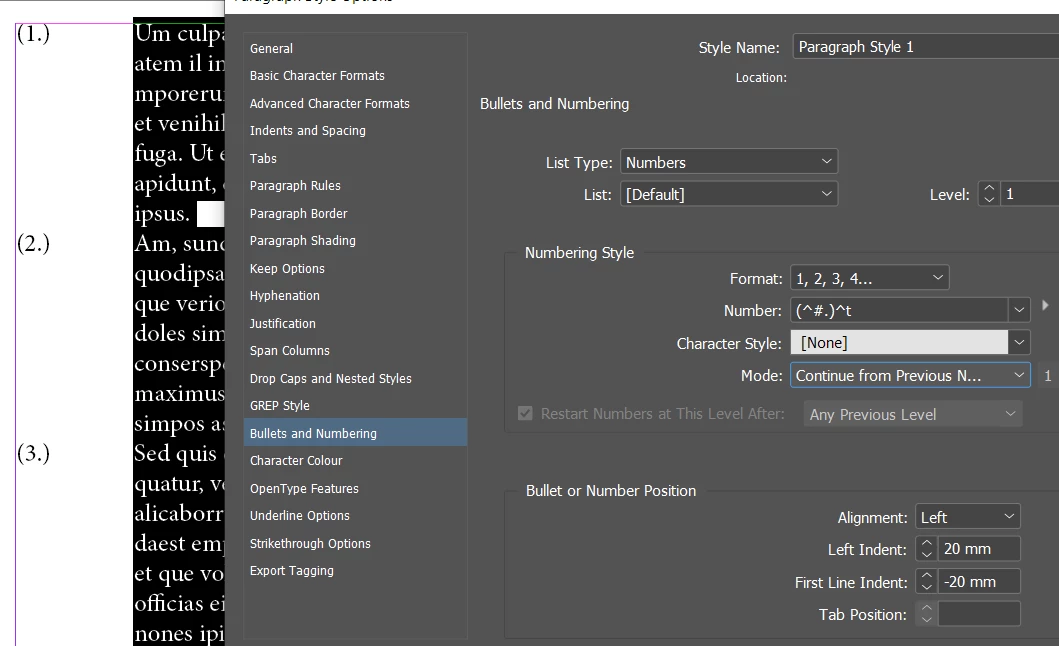
If you can't add a Tab then use a Left Indent. 


Ha - just tried it and it won't allow it - bit silly

Anyway


Use the left indent in the options -and a negative indent to line up your lines.

3 replies

Community Expert
October 31, 2022

Hi @Bedazzled532 ,

instead of a tab before the auto number use an indent for the whole paragraph and a different indent for the first line.

Do that in the applied paragraph style.


Regards,
Uwe Laubender
( Adobe Community Expert )

pixxxelschubser
Community Expert
Community Expert
October 31, 2022

What kind of numbering do you use?
Numbering in paragraph format?
Numbering via the control bar?
Numbering that have been converted to text by menu command?

Bedazzled532
Inspiring
October 31, 2022

I am using numbering from paragraph style menu.

Community Expert
October 31, 2022

You have a numbered list as it's done in the paragraph style?

Go to the Paragraph Style and Bullets and Numbering and insert a Tab before the numbering.


Bedazzled532
Inspiring
October 31, 2022
I tried that but got an error message that i cannot give a tab before
number. I guess thats the way indesign works. Thats why i need a grep yo do
that.

Thanks
Eugene TysonCommunity ExpertCorrect answer
Community Expert
October 31, 2022

You can or at least should. 


If you can't add a Tab then use a Left Indent. 


Ha - just tried it and it won't allow it - bit silly

Anyway


Use the left indent in the options -and a negative indent to line up your lines.