
Participating Frequently
July 15, 2018
Answered

GREP: Changing <H1> Text </H1>

  • July 15, 2018
  • 3 replies
  • 596 views

So I am new to using GREP formatting. Is there a way to say:
"Change all things between <H1> and </H1> to character style Heading 1 (which I have defined)"?

There has to be a way to do this right? It's not <H1>\w</H1> (because that's just one 1 word) and it's not <H1>.*</H1> (I'm not really use how to repeat it).
This topic has been closed for replies.
Correct answer jctremblay

If this is in InDesign, use this:

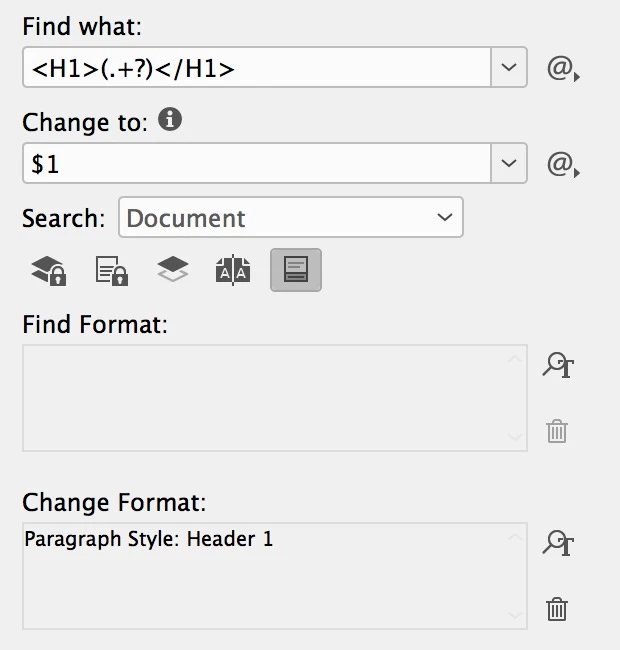
Find: <h1>(.+?)</h1>

Change: $1 with Header 1 style (use a paragraph style, not a character style.

3 replies

jane-e
Community Expert
Community Expert
July 15, 2018

Discussion moved from Adobe Creative Cloud to InDesign

jctremblay
Community Expert
jctremblayCommunity ExpertCorrect answer
Community Expert
July 15, 2018

If this is in InDesign, use this:

Find: <h1>(.+?)</h1>

Change: $1 with Header 1 style (use a paragraph style, not a character style.

Participating Frequently
July 15, 2018

Ok I was able to make that work!

Thanks so much!

John T Smith
Community Expert
Community Expert
July 15, 2018

Please post the name of the program you use so a Moderator may move this message to that forum

-A program would be Photoshop or Dreamweaver or Muse or Premiere Pro or ???

Participating Frequently
July 15, 2018

Oh sorry, I thought I posted in the InDesign CC forum