
Known Participant
December 23, 2016
Answered

Grep code to search for superscript characters?

  • December 23, 2016
  • 2 replies
  • 11555 views

Hello all!

I am wondering if there is Grep code that can be used to search for any

superscript digits or characters in Indesign? For some reason I haven't been

able to discover what it is yet..

Thanks for your help!
    Correct answer jane-e

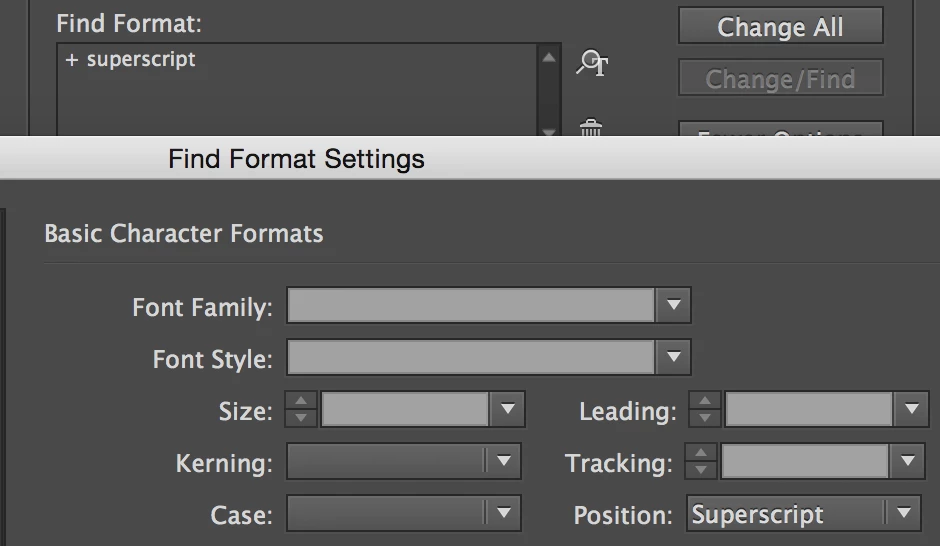
    I was on my iPad before. Here is a screen shot:

    2 replies

    Barb Binder
    Community Expert
    Community Expert
    December 24, 2016

    Hi Awitmer—just clarifying Jane's correct answer, above. You don't need GREP to simply locate text or digits that are using superscript: If there is something behind the question, maybe you do, so in that case come back and let us know. Otherwise:

    Edit > Find/Change

    ~Barb at Rocky Mountain Training
    AwitmerAuthor
    Known Participant
    December 26, 2016

    Thank you so much for your replies!

    I had forgotten that I could find superscript characters with a regular search for text formatting. The reason I was wondering about the grep code was because I was wanting to create a grep style in a paragraph style that would automatically grab all superscript characters and format them with a character style. I suppose that I could just do this formatting in the Find/Change dialog.

    jane-e
    Community Expert
    Community Expert
    December 26, 2016

    Find > Basic Character > Superscript

    Change to > Character Style > NameOfYourCharStyle

    Unless it's a Footnote. You can apply a Character Style in Footnote Options directly.

    jane-e
    Community Expert
    Community Expert
    December 23, 2016

    You can do it with a regular text search for formatting. Is there a reason you need GREP?

    jane-e
    Community Expert
    jane-eCommunity ExpertCorrect answer
    Community Expert
    December 24, 2016

    I was on my iPad before. Here is a screen shot: