
Participating Frequently
May 25, 2023
Answered

GREP expression help. Find the last word in only the first sentence of a paragraph

  • May 25, 2023
  • 2 replies
  • 711 views

Firstly, thank you in advance for reading and helping.


I need to find a GREP expression that will style in bold, only the last word in the first sentance of a paragraph, regardless of what that word is.


I can find the first word in the first sentence, but not the last:

(?=^((\w+)\s )+\w+\.)\w+


So in the below example, only "colony" should be put into bold.


Ants live together in a colony. The average colony has over 100,000 ants in it. That’s a lot of ants!


Any help provided will be greatly appreciated. (This expression needs to work in a paragraph style).
This topic has been closed for replies.
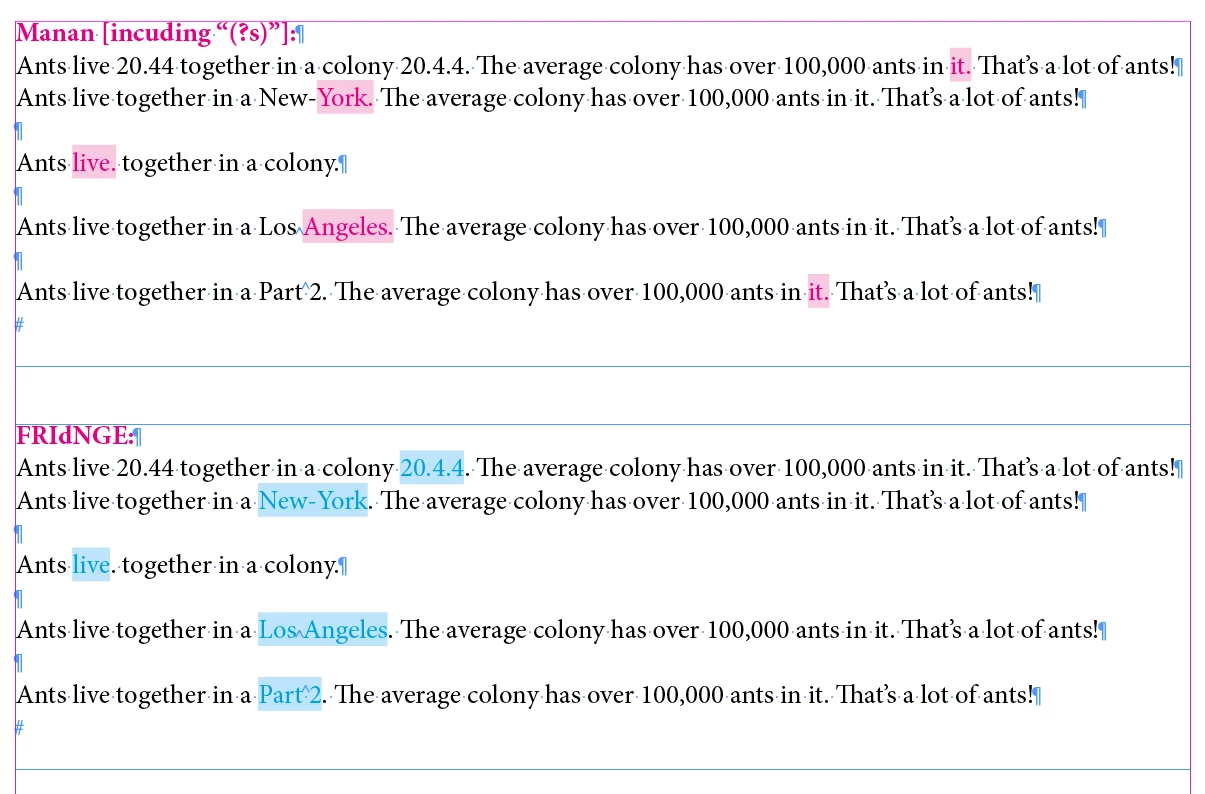
Correct answer FRIdNGE

(?s)^.+?\K\H+(?=\.(?!\d))


(^/)  The Jedi


Finer:


(?s)^.+?\K[~s~S\H]+(?=\.(?!\d))


(^/)

2 replies

Robert at ID-Tasker
Legend
May 25, 2023

Depends on the number of paragraphs - it may slow InDesign significantly - if you set it in ParaStyle. 


Community Expert
May 25, 2023

Hi @SamB5055,

Try the following

^..*?\K\w+(?<!\d)\.(?!\d)

-Manan

-Manan
SamB5055Author
Participating Frequently
May 25, 2023

That works perfectly!


Would you mind breaking it down so I can understand it?

Community Expert
May 25, 2023

Sure. So the ^ means to start the search from the start of the input, this will ensure that we hit the first sentence only. After that we keep on consuming characters but not include it in our final result which is done by \K. After that we search for a word with \w+ which is to be followed by a .(sentence end marker), provided . is not preceded/followed by a number by using negative lookbehind and negative lookahead, this avoids picking a decimal marker within a number as the line end character.

Hope this helps

-Manan

-Manan