
Robert at ID-Tasker
Legend
July 8, 2023
Question

GREP for finding a "sentence"

  • July 8, 2023
  • 4 replies
  • 525 views

Hi all,


Trying to dissect NestedStyles (1st paragraph is done as Text Style Ranges) - got everything else but I'm stuck on the "Sentence".
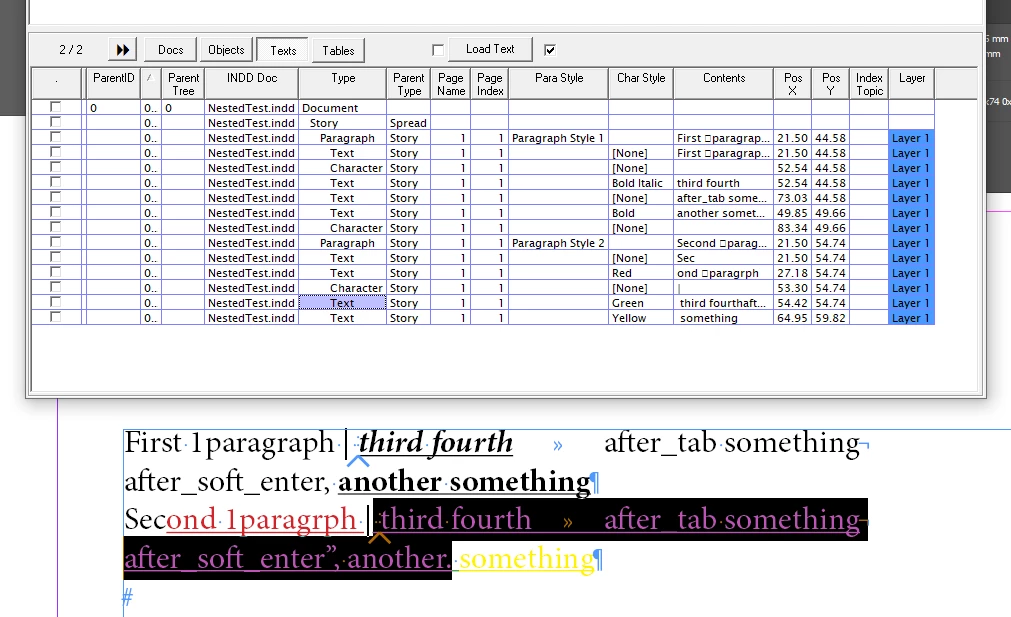
 

Found this somewhere - ".+[.!?'"]+"


But InDesign is including also the Space - because of the "through" - how should I modify the above - or is there a better way ?


TIA

This topic has been closed for replies.

4 replies

pixxxelschubser
Community Expert
Community Expert
July 8, 2023

That comes second.
I completely agree with @m1b . That is exactly the crux of the matter.


First of all, this has to be clarified:

Because sentences like the following are difficult to grasp with Grep.
Prof. Dr. Smith organised a competition. 21,278 people took part. "Nothing is impossible" - that was his motto.


--> How are your sentences structured? What exceptions should be considered?

Robert at ID-Tasker
Legend
July 8, 2023

What I'm trying to achieve is recreating NestedStyles functionality. 


I want to find "sentence" from the current cursor position - or rather end of previous NestedStyle occurrence.


Robert at ID-Tasker
Legend
July 8, 2023

Thanks @pixxxelschubser and @m1b for a quick replies.


My goal is to show structure of the text - based on the Nested Styles applied to the Paragraph - so the "sentence" will be anything that ends with ".", "!", "?", right? And maybe """, "'"? 


What I'm using right now is almost working - but like I've said - InDesign is also including a space after the ".". 


So, in general, I'm looking for InDesign's definition of a "sentence".


m1b
Community Expert
Community Expert
July 8, 2023

Here is an example nested style that seems to work (it doesn't select the space):

Is what you are trying to reproduce? It's not clear what you've tried already and what feature you want to use. Maybe you want to use a grep style? Or are you scripting? It always helps to show a very simple and clear example.

- Mark

Robert at ID-Tasker
Legend
July 8, 2023

Up to ignores the space - but "through" will include it. 


And I want to do it though GREP - on the text - to find what InDesign is finding - with NestedStyles - kind of simulate it myself.


Going through Text Style Ranges is piece of cake - 1st paragraph in my example screenshots. 


All other NestedStyles breakpoints are not a problem - only the "sentence" is a problem - hot to include all "white spaces" after the end of the "sentence" - the same way as InDesign is doing. 


By the way - two of them are in scripting - but no longer in the UI - DropCap and one more - can confirm tomorrow. 


m1b
Community Expert
Community Expert
July 8, 2023

Hi @Robert at ID-Tasker, first you must define a sentence in rigorous terms (as you did with the regex). You can google to see various definitions. Then you can pick one that suits your needs. Each definition will have trade-offs, because sentences are difficult to delineate in some cases. If you have sample data, then perhaps you can derive a sentence definition from that—by ensuring that the definition selects all sentences in the sample data.

- Mark

pixxxelschubser
Community Expert
Community Expert
July 8, 2023

Hi Robert,

what exactly do you want to find?
Because what you have marked is not a sentence by definition.