
SebastiaoV
Known Participant
October 3, 2023
Answered

GREP French or Strait quotes into to Smart or Curly quotes

  • October 3, 2023
  • 2 replies
  • 1880 views

Hi people!
Which is the GREP command to turn the French Quotations or i guess they are also called strait quotes into Smart or Curly Quotes? 

I do have click on Typographic Quotes into Preferences, but even though the imported text came with this non curly quotes. This is the sample of the actual text. I want those quotes to be converted to the regular and most modern curly format. 
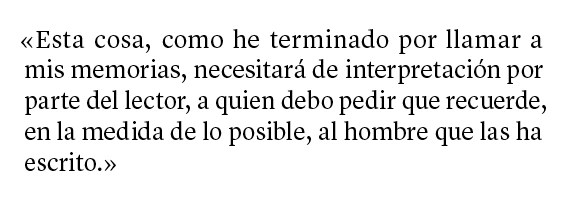

Thanks for your help and good advice,
Cheers

This topic has been closed for replies.
Correct answer Willi Adelberger

In InDesign’s Preferences > Dictionary you can set up the correct typographic quotation marks for each language separately. 
In preferences you can also switch to typographic quotation marks. 

If you have done that, you can replace " with " and you get as result the correct quotation marks. 

2 replies

Willi Adelberger
Community Expert
Willi AdelbergerCommunity ExpertCorrect answer
Community Expert
October 4, 2023

In InDesign’s Preferences > Dictionary you can set up the correct typographic quotation marks for each language separately. 
In preferences you can also switch to typographic quotation marks. 

If you have done that, you can replace " with " and you get as result the correct quotation marks. 

m1b
Community Expert
Community Expert
October 3, 2023

Hi @SebastiaoV, I don't know of an automatic way—there may be one!—but you can at least do a simple find/change:


You have to search for the opening quotes first, and change them, and then do the same for the closing quotes. If you have trouble typing anything you can use the Glyphs Panel, and search for "quotation" (assuming unicode names appear in English?) and you will see all the different quotation glyphs.


Sorry if I have missed your point.

- Mark

Joel Cherney
Community Expert
Community Expert
October 4, 2023

When I tested this, it worked only when the language was marked as a language that should have typographer's quotes. If I have text marked as Arabic, and have "Use Typographer's Quotes" turned on in the Preferences, and tried the Find/Change query you specified, Mark (turning left double-chevron quotes into straight quotes), then the double-chevron quotes remained. Because, if Typographer's Quotes are turned on in the Preferences, that is what a straight quote should look like in Arabic. 


Fortunately for you, SebastioV, InDesign believes that Spanish should have "curly" quotes, and not double chevrons. So if your text is marked as Spanish (or English, or a wide variety of other languages) then Mark's Find/Change query should work perfectly. This would make my entire post seem useless, but if your text is coming in with double chevron quotes because it's marked in InDesign as French (or Arabic, or one of the smaller list of languages that use double chevron quotes), then the Find/Change query Mark suggested won't work. 


Additionally, you don't need to run two queries for the left and right facing double chevron quotes, if you do a GREP search for 

«|»

(that's "left double chevron quote OR right double chevron quote")


and replace with a straight double quote

"


m1b
Community Expert
Community Expert
October 4, 2023

Excellent! Thanks @Joel Cherney.