
danielw42205661
Known Participant
August 25, 2022
Answered

Grep help

  • August 25, 2022
  • 4 replies
  • 352 views

I have a document with a lot of "Motion X" in it, and am trying to do a big find and replace.


I dont have a good handle on grep and have done the expression "Motion\s\d*" which does work, but it is also including text such as "Motion carried / lost". Example below.
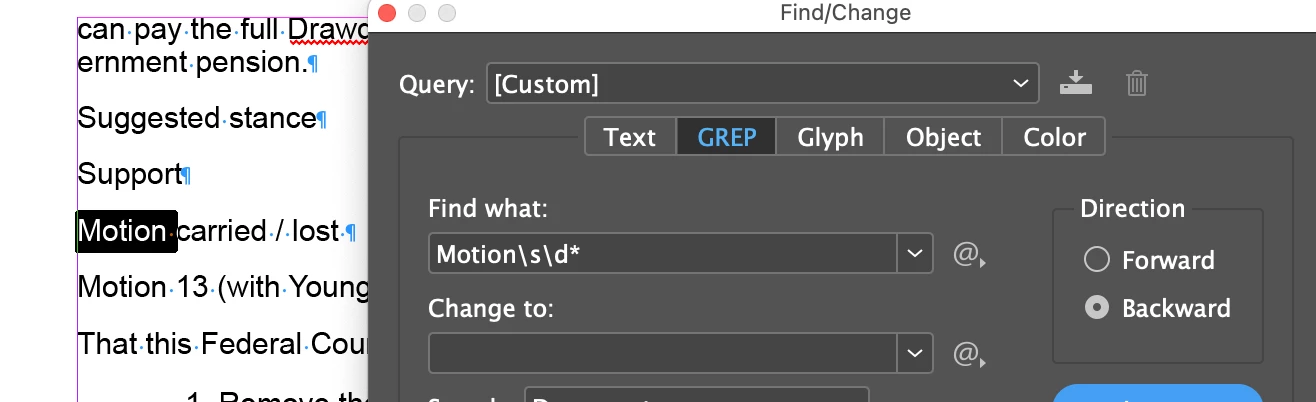


I just want to restrict it to finding the word "Motion", then a space and then a number after it (could be 1 to 3 digits). 


I did play around with using square brackets but that didn't seem to help. Any help would be greatly appreciated, thanks.


This topic is closed to new replies. Start a new post to keep the conversation going.
Correct answer Laubender

Hi @danielw42205661 ,

the * od d  means zero or more digits.


You could try also this:

Motion\s\d{1,}

Which means one or more digits in a row. You could restrict the maximum number of digits in a row if you add a second number after the comma. Or you could change the first number to 2 if you want to find only a minimum of two digits in a row.


Regards,
Uwe Laubender
( Adobe Community Professional )

4 replies

LaubenderCommunity ExpertCorrect answer
Community Expert
August 25, 2022

Hi @danielw42205661 ,

the * od d  means zero or more digits.


You could try also this:

Motion\s\d{1,}

Which means one or more digits in a row. You could restrict the maximum number of digits in a row if you add a second number after the comma. Or you could change the first number to 2 if you want to find only a minimum of two digits in a row.


Regards,
Uwe Laubender
( Adobe Community Professional )

Community Expert
August 25, 2022
quote
\d{1,}

By @Laubender

That is such an awesome GREP! 

Community Expert
August 25, 2022

Are you trying to replace the word Motion?


Motion\s\d+?


If you want to replace just the word Motion

Motion(\s\d+?)

Change to

New Word$1


Does it ever have Motion 1.01 (with decimals)?