Known Participant
December 2, 2020
Answered

Grep Help with no break

  • December 2, 2020
  • 3 replies
  • 795 views

Trying to create a line of text that doesn't break on a name followed by a space, a bullet character, and a space. I want the entire name on the same line followed by the space and bullet character with no break, but when I try to create the grep expression for it all the text goes out of the text frame. I have managed to apply a different character style to every other name, and I can apply no break to either style successfully, but if I apply it to both styles it treats the paragraph like one big no breaking line of text. Anyone have a suggestion how to create the appropriate grep expression?

This topic has been closed for replies.
Correct answer JR Boulay

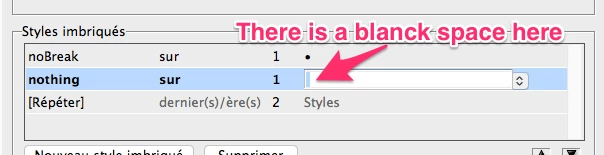
You can use Nested styles: apply the noBreak style up to the bullet, apply the nothing style (which does nothing) on/up to the blank space following the bullet (so it should break the line here), and repeat last 2 styles.


3 replies

JR Boulay
Community Expert
Community Expert
December 3, 2020

Sorry for the "blanck" typo and sorry for InDesign's silly translation of "last", which is horrible in French.


Acrobate du PDF, InDesigner et Photoshopographe
Barb Binder
Community Expert
Community Expert
December 3, 2020

@JR Boulay That is a great solution and I'm marking it as correct. It does exactly what @mompcomike is looking for.


@mompcomike I'm including an English language screen shot in case JR's French language screen shot is confusing. Remember to add the space in the row below the bullet.


~Barb 

~Barb at Rocky Mountain Training
JR Boulay
Community Expert
JR BoulayCommunity ExpertCorrect answer
Community Expert
December 2, 2020

You can use Nested styles: apply the noBreak style up to the bullet, apply the nothing style (which does nothing) on/up to the blank space following the bullet (so it should break the line here), and repeat last 2 styles.


Acrobate du PDF, InDesigner et Photoshopographe