colinrogger
Inspiring
February 1, 2023
Answered

GREP issue

  • February 1, 2023
  • 2 replies
  • 846 views

Hi.

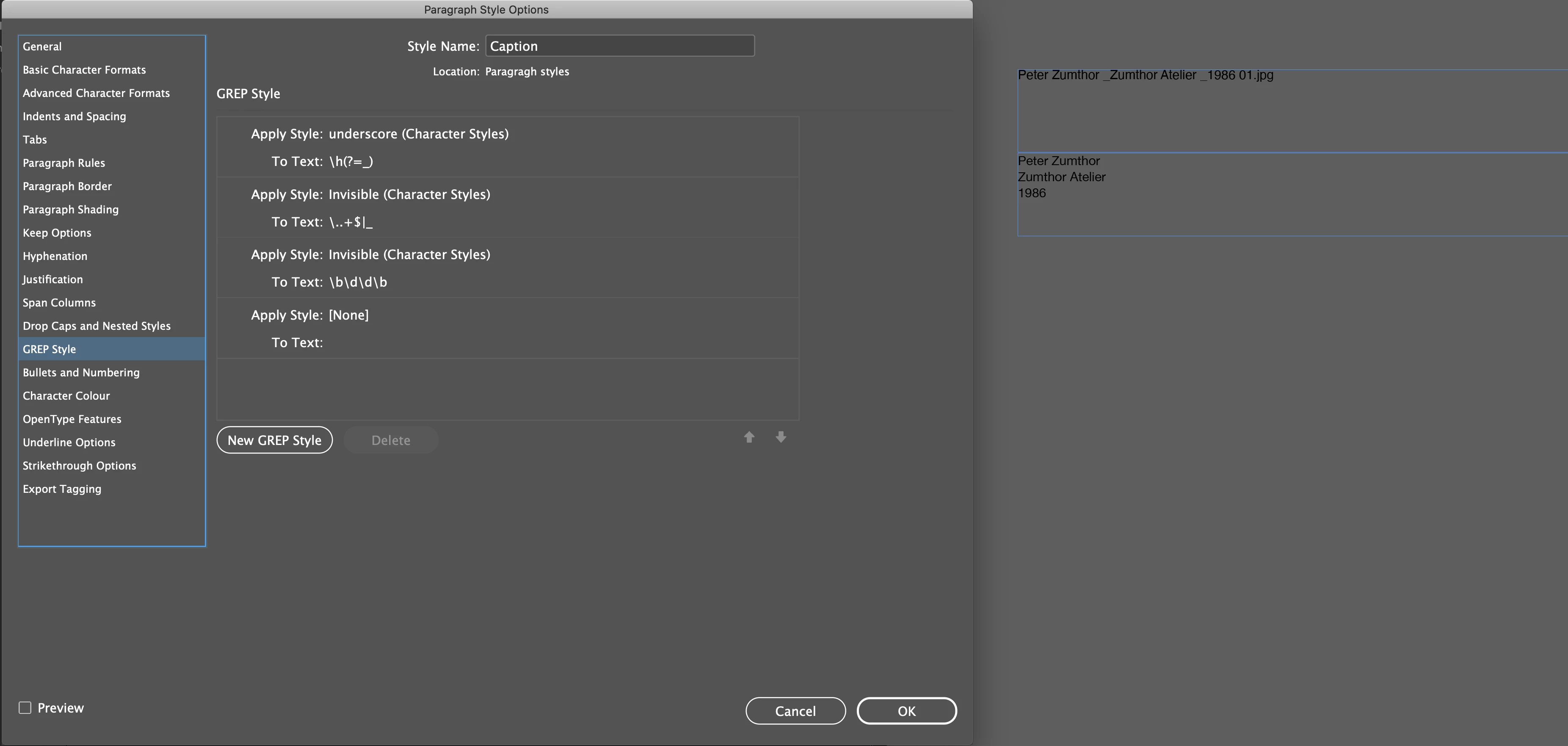
I have a paragraph style with the following GREP setup. However, for it work, It requires I have a space before each underscore in my file name.


Is there a way to slightly alter the GREP to make it possible for the file to be named "Peter Zumthor_Zumthor Atelier_1986 01.jpg" and still have the automatic return and hiding of the underscore.
Thanks!

This topic has been closed for replies.
Correct answer colinrogger

Some details, maybe?


Sorry, Basically that it is not possible to do the Apply style in the way I want without a space before the underscores. The space is essential to ensure the character styles are applied to the correct elements found using the GREP style.

2 replies

Peter Kahrel
Community Expert
Community Expert
February 1, 2023

Clever! You force the paragraph to break on those spaces.

Maybe apply the underscore character style to the underscore. That seems to work fine when I try it.

Why do you use a GREP style for this, by the way? I think it just adds overhead.

colinrogger
Inspiring
February 1, 2023

Thanks, Got some help on it from someone on the forums, super helpful! 

Honestly, this just seemed to work, although this is the first time I am trying to automate my workflow in indesign. 


The project is collating a bunch of images, 350 into a book. Then we wanted to captions to be auto created based on file names. Plus we wanted each part of the file name on a different line. So that is how we landed on this solution. 


colinrogger
Inspiring
February 1, 2023

Sorry forgot to add the images. These are the types of files we have. and this is how we wanted it to end up looking 

Peter Kahrel
Community Expert
Community Expert
February 1, 2023

With a GREP style you can't insert any text or codes such as paragraph breaks: al you can do it apply formatting. There are ways to set things up that suggest that characters were inserted or changed, but that's trickery with conditions and hiding character styles. I don't think that that would work for you.


You should probably use a GREP replacement.

colinrogger
Inspiring
February 1, 2023

Hi Peter,

Yeah I was reading that that is the case. That is why I was using a moving trick for the paragraph break. The underscore character style was set up with the following settings - 

Tracking: 10000

Horizontal scale: 1000%

That is how I was managing to do achieve the result on the right side of the image. However, as soon as I have removed the space before each underscore, the trick with the character style didn't work anymore. Instead it just did the GREP applying the invisble style, which is:

size: 0,1

Horizontal scale: 1%

Vertical scale: 1%

Character colour: None