Known Participant
February 26, 2019
Answered

Grep query

  • February 26, 2019
  • 5 replies
  • 2606 views

I've set up the GREP rules in my document so that all the numerals in the body copy are OSF, I want to single out dimensions of things to have them ignore that GREP rule. All the dimensions look like this (3.5 × 7.5 in) or this (3.5 × 7.5 cm). At the moment I'm just using a simple \d+ to find the digits and change them. I've tried using negative lookbehinds/aheads but it either just takes one of the numbers or all of the numbers in the text. Anyone got a simple fix?

Thanks!

This topic has been closed for replies.
Correct answer Michael Bullo

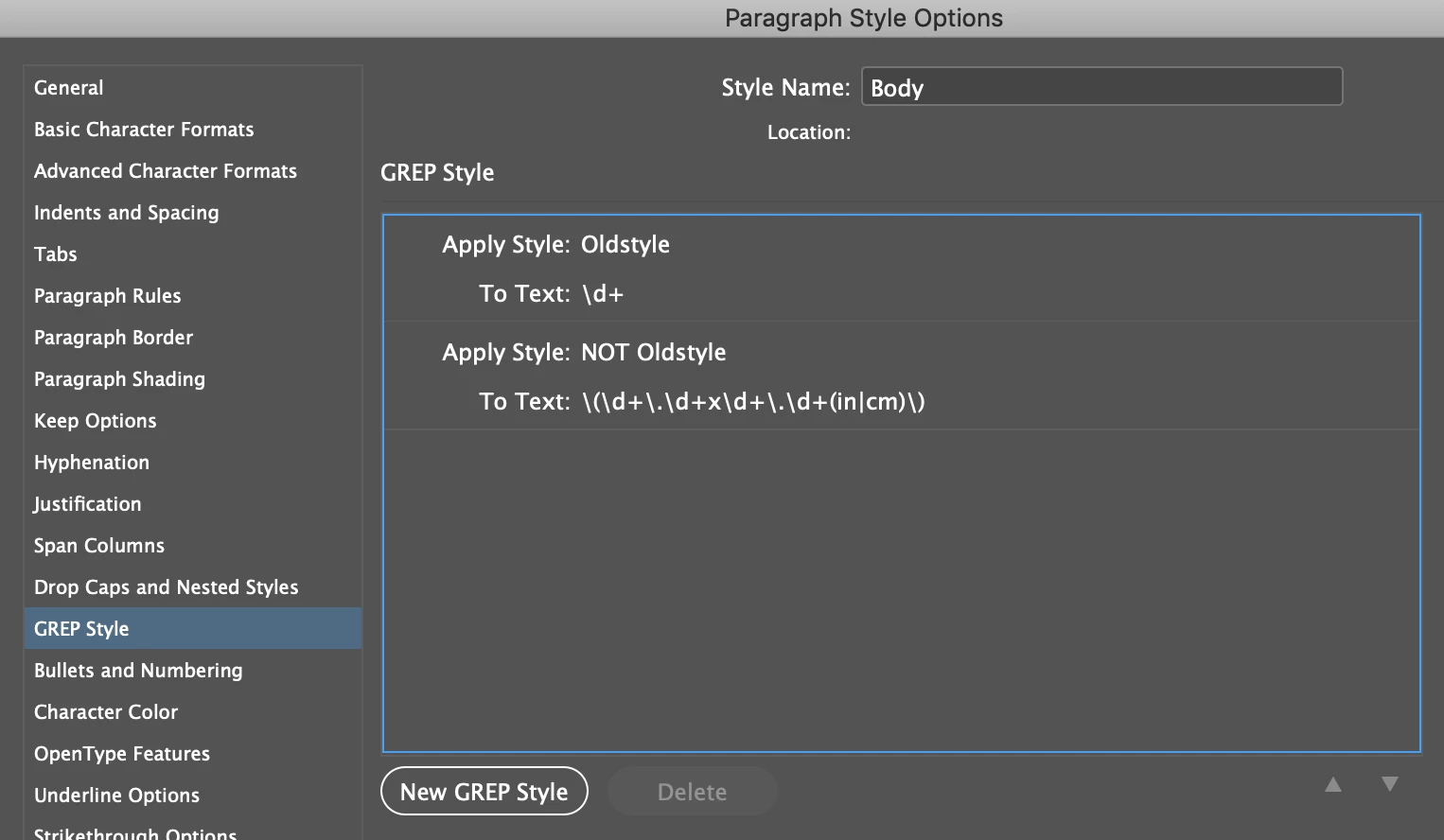
I've built out an example of what I described in my last post. The logic is that I add a GREP Style "Oldstyle" to change all numbers to Proportional Oldstyle. I then apply a second GREP style "NOT Oldstyle" which applies a regular number style to anything it finds in brackets which includes a decimal number, followed by an "x", followed by another decimal number and lastly followed by "in" or "cm". I ran this on your text and it works if I correctly understand what you are trying to achieve

Character Style: Oldstyle

In the OpenType Features section sets the Figure Style to Proportional Oldstyle

Character Style: NOT Oldstyle

In the OpenType Features section sets the Figure Style to Tabular Lining

Paragraph Style: Body

GREP Style #1

Character Style: Oldstyle

\d+ - Any digit, one or more times

GREP Style #2

Character Style: NOT Oldstyle

\(\d+\.\d+x\d+\.\d+(in|cm)\)

\( - Opening bracket

\d+ - Any digit, one or more times

\. - Decimal point

\d+ - Any digit, one or more times

x - An actual letter "x"

\d+ - Any digit, one or more times

\. - Decimal point

\d+ - Any digit, one or more times

(in|cm) - The literal text "in" or "cm"

\) - Closing bracket
If your text contains spaces, just add these to the GREP Style definition...

To find: (3.5×7.5in)

\(\d+\.\d+x\d+\.\d+(in|cm)\)

To find: (3.5 × 7.5 in)

\(\d+\.\d+ x \d+\.\d+ (in|cm)\)

5 replies

Michael Bullo
Community Expert
Michael BulloCommunity ExpertCorrect answer
Community Expert
February 27, 2019

I've built out an example of what I described in my last post. The logic is that I add a GREP Style "Oldstyle" to change all numbers to Proportional Oldstyle. I then apply a second GREP style "NOT Oldstyle" which applies a regular number style to anything it finds in brackets which includes a decimal number, followed by an "x", followed by another decimal number and lastly followed by "in" or "cm". I ran this on your text and it works if I correctly understand what you are trying to achieve

Character Style: Oldstyle

In the OpenType Features section sets the Figure Style to Proportional Oldstyle

Character Style: NOT Oldstyle

In the OpenType Features section sets the Figure Style to Tabular Lining

Paragraph Style: Body

GREP Style #1

Character Style: Oldstyle

\d+ - Any digit, one or more times

GREP Style #2

Character Style: NOT Oldstyle

\(\d+\.\d+x\d+\.\d+(in|cm)\)

\( - Opening bracket

\d+ - Any digit, one or more times

\. - Decimal point

\d+ - Any digit, one or more times

x - An actual letter "x"

\d+ - Any digit, one or more times

\. - Decimal point

\d+ - Any digit, one or more times

(in|cm) - The literal text "in" or "cm"

\) - Closing bracket

If your text contains spaces, just add these to the GREP Style definition...

To find: (3.5×7.5in)

\(\d+\.\d+x\d+\.\d+(in|cm)\)

To find: (3.5 × 7.5 in)

\(\d+\.\d+ x \d+\.\d+ (in|cm)\)

DativeAuthor
Known Participant
February 27, 2019

I understand the logic Michael and thank you for taking the time to explain it to me, what you've written there is very similar to what I had written except I'd included 'zero or more times' around the decimal points and second digits and also \s instead of space just in case people had used varying spaces.

\(\d+\.?\d?\s×\s\d+\.?\d?\s(in|cm)\)

I didn't think you could cancel out one GREP with another but that wasn't the problem, the error I was making was to do with the multiple variations of typeface, the character style was set to the expert and so had no lining version. All fixed now! Thanks for your help

Michael Bullo
Community Expert
Community Expert
February 27, 2019

My pleasure Dative.

Michael Bullo
Community Expert
Community Expert
February 27, 2019

Hi Dative. If I understand correctly you can, using GREP Styles, alter all numbers as well those you don't want to alter. Have you tried applying a GREP style to all numbers and then applying a second GREP style that effectively un-alters those that you don't want to change?

What I'm suggesting is really an expansion of what John Mensinger was saying when he mentioned adding a second GREP style.

An example using fonts…

1. Default Paragraph Style applied to everything that applies the font Minion Pro.

2. Apply a GREP Style that changes all numbers to Arial.

3. Apply a second GREP Style that changes specific numbers back to Minion Pro.

DativeAuthor
Known Participant
February 27, 2019

I've tried this but, as I've tried numerous times before, the second GREP style doesn't cancel out the first. I need a specific GREP query that will find all digits excluding the bracketed dimensions.

Inspiring
February 27, 2019

I suggest changing the paragraph style, but if for some reason you are unable to do this you can try setting a nested style to go to the end of the paragraph with the OSF char style, and then a new char style applied with GREP style will trump the nested style.

Inspiring
February 27, 2019

Sounds like your constant in this situation is the multiplication symbol. Try something like this:

(\d+?\.\d+?(?= [x×]))|((?<=[×x] )\d+?\.\d+?)

This will look for either a multiplication symbol or a normal "x" character (just in case someone entered in the x incorrectly).

DativeAuthor
Known Participant
February 27, 2019

This would work if I just wanted to find them but what I actually need is to find all numbers EXCEPT them.

Inspiring
February 27, 2019

Oh, I see.


Then the best is to just set your paragraph style to use OSF under open type formats and then change the dimensions using the GREP above to not be OSF.

Stephen Marsh
Community Expert
Community Expert
February 26, 2019

I think some screenshots with invisibles on, or some copy/paste of the text that you don’t want to change would be helpful. It is all about patterns and the patterns are going to be dependent on context.

DativeAuthor
Known Participant
February 26, 2019

I did copy and paste the text I didn't want to change above, it all appears as ((number possibly with a decimal point) × (number possibly with a decimal point) in) or ((number possibly with a decimal point) × (number possibly with a decimal point) cm). What would you like me to take a screenshot of?

Stephen Marsh
Community Expert
Community Expert
February 26, 2019

I thought that patterns such as (3.5 × 7.5 in) needed a different grep style applied than other digits?

What would be helpful is what I asked for, a screenshot with invisibles turned on showing both the text that should not change and the text that needs to change.

Or a copy and paste, such as:

Here are some numbers 1, 2 and a double digit 27 that should not change style, however I need patterns such as this (3.5 × 7.5 in) to change to a totally different grep style without affecting the previous numbers in red.
John Mensinger
Community Expert
Community Expert
February 26, 2019

I'm not necessarily a GREP hero, so someone may be able to improve upon this, but you can try Find: (\(.+?\)) Change to: (a Character style with Lining Figures set)

Or, since it's only a formatting change, a GREP Style is applicable.

DativeAuthor
Known Participant
February 26, 2019

Hi John, thanks for your answer, I've actually set it to find all digits as a GREP style within a paragraph style so short of changing the original GREP query I can't alter it using find and replace or even by changing it manually.

John Mensinger
Community Expert
Community Expert
February 26, 2019

Okay, so if you add a second GREP style (the one shown above) to that paragraph style it will run after the first and set your dimensions to lining figures.