Inspiring
July 21, 2009
Answered

GREP query that changes to character format

  • July 21, 2009
  • 1 reply
  • 868 views

I am trying to create a GREP query that finds a single capital letter K surrounded by parenthesis -- like this: (K). I was able to get that far, so that in the GREP Find What I have \(K\)

I need to change this to (K) with only the letter K changing to a different font or character style; the parenthesis need to remain in the same font as before, matching the rest of the paragraph. I see that I can change the format in the GREP dialog, but if I do, it changes the format of the parenthesis as well as the K. The font that I need to change the K to is a picture font.

If anyone can help with a suggestion on this, I'd really appreciate it.
This topic has been closed for replies.
Correct answer Jongware

A minor detail, I hope. I left out that the Lookbehind/Lookahead functions are search functions, not replace.

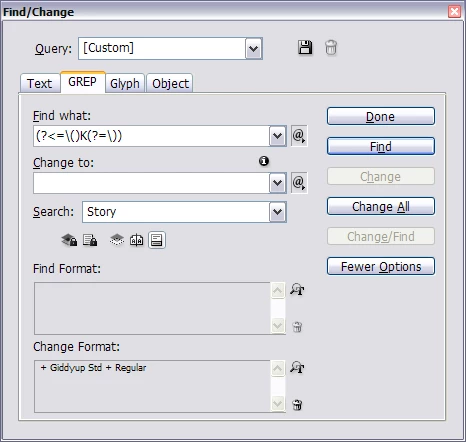
Put the find text in the GREP Find text field, not in the regular Find. Then, make sure the Change To field is empty -- drag your mouse over it, and if you see something selected, hit Delete. Only because you put something into the Change Format, InDesign knows it shouldn't replace the text with nothing, but apply the formatting instead.

It should look like this:

1 reply

Jongware
Community Expert
Community Expert
July 21, 2009

Positive Lookbehind/Lookahead. This GREP expression

(?<=\()K(?=\))

does the trick. I've coloured the different parts: red is the lookbehind, green is the lookahead, black is regular text.

In essence, it finds (selects) any capital K which is preceded and succeeded by parentheses. Replace with what you like -- the parentheses are not touched.

It's useful to know there is also a negative lookbehind/lookahead. The expression

(?<!\()K(?!\))

will find any capital K except those surrounded by parentheses.

Inspiring
July 21, 2009

Jongware,

Thank you for your reply. I must be missing some small detail because the results that I'm getting after using the GREP Find/Change are that the (K) is replaced with (?  ()K(?  )) in the text, so it is not working.

In Find What is   \(K\)

In Change To is   (?<=\()K(?=\))

and in Change Format I have the Font that I need to use.

What am I doing wrong?

Jongware
Community Expert
JongwareCommunity ExpertCorrect answer
Community Expert
July 21, 2009

A minor detail, I hope. I left out that the Lookbehind/Lookahead functions are search functions, not replace.

Put the find text in the GREP Find text field, not in the regular Find. Then, make sure the Change To field is empty -- drag your mouse over it, and if you see something selected, hit Delete. Only because you put something into the Change Format, InDesign knows it shouldn't replace the text with nothing, but apply the formatting instead.

It should look like this: