
Answered
GREP Style: find 2 or more words, only first letter cap
Hi, I'm using ID CS4, I need to find all words in the paragraph like this: Any Two Or More Words followed by body texts onwards.
Can anyone pls help, thanks.
Lily

Hi, I'm using ID CS4, I need to find all words in the paragraph like this: Any Two Or More Words followed by body texts onwards.
Can anyone pls help, thanks.
Lily
To find 2 or more capitalized words, use this GREP:
\b\u\w+(\s+\u\w+)+
Lots of escaped codes! Let's go through them one at a time.
The first \b is a word break. In this position, it means the next character (which must be a letter) must be at the start of a word. It is called "word break" because you can also use it to mark the end of a word ("rune\b" will find "prune" but not "runes"), and the full technical explanation is "there must be a word character on one side and not one on the other side".
\u is a shortcut for "any single uppercase character". It matches A-Z, Α-Ω (Greek), and even А-Т (Cyrillic), with or without accents!
\w is a shortcut for "any single word character". A "word" character is anything that can be part of a word, so both uppercase A-Z and lowercase a-z, 0-9, as well as loads of Greek, Cyrillic, Hebrew, Arabic, Japanese, Chinese, and Thai characters. Some that are not "word" are: spaces, punctuation, parentheses, hyphens, and the '&' character.
The '+' ensures 'one or more' word characters must follow the initial uppercase.
\s is a shortcut for "any space character". It will not only match a single space, but also a tab and InDesign's list of more specialized whitespace characters – nonbreaking, third, en, em, figure, and so on.
Again, the '+' allows more than one.
This is followed by another group of 'at least one capital, then anything'.
There are parentheses around the space-then-next-word and a '+' after this, because this entire group – the space plus a possible second word – must occur at least once, and may occur more. This will grab entire sequences of capitalized words at once.
This is what it looks like:
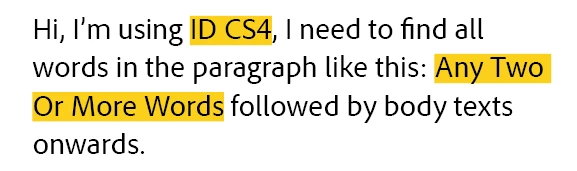
It ignores the first "Hi, I" because there is a comma in between, and also "I" is not followed by (at least) one additional letter. It then correctly picks up the combination "ID CS4", stopping at the first non-word character (the comma), and then it matches the entire phrase "Any Two Or More Words" as one long sequence.
Already have an account? Login
Enter your E-mail address. We'll send you an e-mail with instructions to reset your password.
 AdChoices