
Inspiring
October 29, 2018
Answered

GREP style in paragraph with ~b \r or \n?

  • October 29, 2018
  • 1 reply
  • 2516 views

Dear Indesign users,

Im trying to use this GREP

<2>[^\]]+\<2>

to adjust the text like this picture below
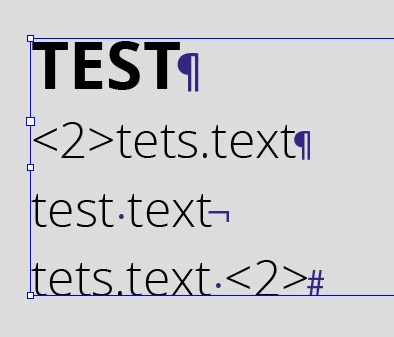
But it doesn't work, If I'm removing the hard return for an soft return it works perfectly, how come?

Already thanks for all the help.

Greetings

This topic has been closed for replies.
Correct answer Laubender

beh_gras_beh  wrote

… If I'm removing the hard return for an soft return it works perfectly, how come?

GREP Styles are working per paragraph only.

Regards,
Uwe

1 reply

LaubenderCommunity ExpertCorrect answer
Community Expert
October 29, 2018

beh_gras_beh  wrote

… If I'm removing the hard return for an soft return it works perfectly, how come?

GREP Styles are working per paragraph only.

Regards,
Uwe

Inspiring
October 29, 2018

Hi Laubender,

Thank you for the reply.

Is there an other way to cange the style with an GREP? Or do I have to this by script?

Greetings

Community Expert
October 29, 2018

You can do it with a two-step process.

1. Apply the GREP Style to the paragraph style

2. Exchange the hard return with a soft return by using GREP Find/Change

If it's always a <2> you can use a positive lookbehind for the whole contents of the paragraph plus the hard return for find.

And a soft return for change.

Find:

^<2>.+\K\r

leave the format blank

Change:

\n

leave the format blank

Tested with InDesign CC 2018.1 on Windows 10.

Regards,
Uwe