


December 16, 2025
Answered

GREP Style Question

  • December 16, 2025
  • 4 replies
  • 615 views

Hello all,


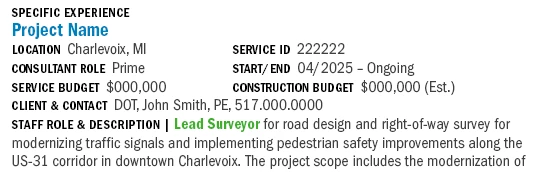
I'm trying to use GREP styles to accomplish a few things. I'd like to (1) style the Project Name, and (2) add a tab before Service ID and Start/End. Any idea of how to do that? I'm proid to say that I have figured out how to style the bolded characters.

 

april_5679_0-1765901056090.png


Correct answer Peter Kahrel

If the project name always immediately precedes the Location tag, then you can use this GREP query:

Find what: ^.+\r(?=Location)

Change to: <Leave empty>

Change format: The paragraph style used for the project name

4 replies

December 18, 2025

Hi all,


Please let me provide a little more information. Our content is being brought in by our database. Essentially, the database strips all formatting so we're trying to do some level of auto formatting when the database dumps the information into InDesign. 


We are using the Find/Change Queries, as Peter noted, to add a Tab before Service ID, Start/End, and Construction Budget. I was hoping that maybe we could use GREP to auto apply a style to the Project Name. My first thought was to maybe add a character like | before the Project Name and then use GREP to apply the style to every instance of a 'sentence' that starts with |.

Peter Kahrel
Community Expert
Peter KahrelCommunity ExpertCorrect answer
Community Expert
December 18, 2025

If the project name always immediately precedes the Location tag, then you can use this GREP query:

Find what: ^.+\r(?=Location)

Change to: <Leave empty>

Change format: The paragraph style used for the project name

December 29, 2025

Bingo!!! Thank you, Peter! This works perfectly. I have one more riddle for you. Is there a way to add a space before the project name? ( I could delete the space for the first instance but having a space would automatically separate the projects.)

Peter Kahrel
Community Expert
Community Expert
December 16, 2025

I don't think that this is a good case for nested styles, GREP or otherwise. In Rob's example, the use of nested styles depends on the presence of en spaces, which may not be the case. Furthermore, april mentions that they want to add a tab,  and you can't add characters using a nested style.


The straightforward way to deal with this is a couple of Find/Change queries. Some apply bold to the labels (Location, consultant role, etc), and some apply bold and insert a tab (Service ID, etc.). Three or four queries would do it, and if files like these come up regularly those queries can be excecuted in one go by any of the several scripts that let you batch-run any number of Find/Change queries .

rob day
Community Expert
Community Expert
December 16, 2025

Hi @april_5679 , You should be able to do it with a Nested Style and an en space or a non breaking space as a marker. Something like this:


Screen Shot 19.png


Screen Shot 18.png

Mike Witherell
Community Expert
Community Expert
December 16, 2025

Hi April,

In your example, the Project Name in blue only needs to have a paragraph style applied. This assumes it is on a line with a hard return.

Adding a tab before a specific string of letters like SERVICE ID would only require a Find/Change in the Text tab.


Would you care to upload a sample of this text layout?

Mike Witherell