Participating Frequently
June 7, 2017
Beantwortet

GREP Style to remove a character symbol

  • June 7, 2017
  • 3 Antworten
  • 16223 Ansichten

How would I remove a character symbol within a set of words?  The example below has "~" that needs to be removed from the description.

Huggable Suit Hangers~ Black Pkg/10

Thanks in advance

Beste Antwort von amaarora

Hi,

Use Find/change?

Find=~

Change=(nothing)
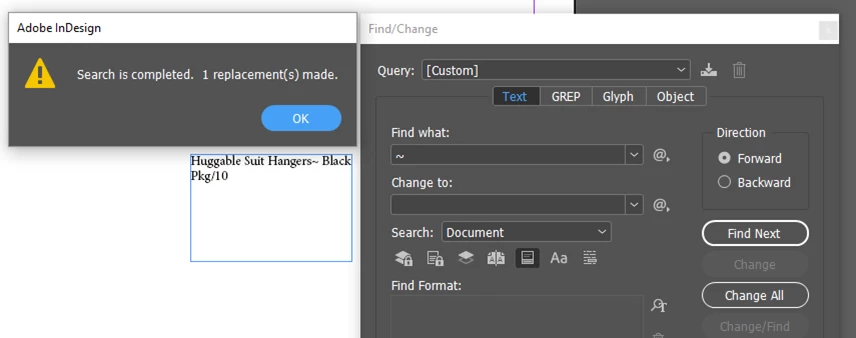
-Aman

3 Antworten

Participant
May 31, 2018

Hi,

This can be accomplished by setting up a Character style that reduces the point size of the text to 0.1 and changes the color to the same color of the background.

The character style setup I used is below:

Then I applied this to my paragraph style as a GREP style to remove all brackets when close together with a space after them in text. E.g. "Text text text () text text text (text)"

It would remove the "() " and leave the text as below:

"Text text text text text text (text)"

The grep setup was as follows:

And the example in the actual text with no style attached:

With the style attached:

Below is the GREP i used for your example using the same Character style detailed above:

The reason for the extra \ is to remove the space after this character if one exists.

So a GREP to remove both "~ " with a space and to remove "~" without a space after would be:

Hope this helps.

Thanks

amaarora
Community Manager
amaaroraCommunity ManagerAntwort
Community Manager
June 7, 2017

Hi,

Use Find/change?

Find=~

Change=(nothing)

-Aman

Participating Frequently
June 7, 2017

Thanks!  I've been doing find change, but thought there was something that I could do to eliminate the extra clicks since I have other character symbols that need to be removed as well.

Barb Binder
Community Expert
Community Expert
June 7, 2017

A GREP style can be used to assign formatting to a pattern, but not to remove anything.

Do you need to simply remove every ~ from the document? You can do that with a Text find/change. (Leave Change to blank.)

Or is there a pattern involved to isolate just specific ~'s? In that case, a GREP find/change might be the answer. We'll need more information about how/where the ~'s appear to help you with that.

~Barb at Rocky Mountain Training
Participating Frequently
June 7, 2017

I should've added some additional detail.  I typically use find/change as you detailed above, but I thought there could be a way to have it be automatically removed through a GREP style/expression somehow.  There are other character symbols that can be in descriptions that I copy from a spreadsheet so I'm doing several clicks through the find/change to remove them all.

Barb Binder
Community Expert
Community Expert
June 7, 2017

In that situation, a regular text find/change is what you want, as Aman and I both described above.

But, did you know you can save your queries (top row of my screen shot) to make this quicker--then just select them from the list In the future? And you can buy a plug-in that can string them together for you to save even more time!

http://www.automatication.com/index.php?id=24

~Barb at Rocky Mountain Training