Known Participant
November 25, 2022
Answered

GREP to apply a style to any digit plus the 1st word after it

  • November 25, 2022
  • 5 replies
  • 1030 views

Hi,


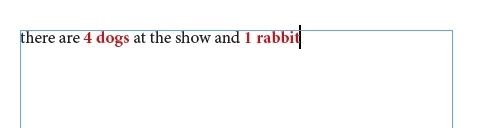
I have some text like "there are 4 dogs at the show and 1 rabbit".


I want to bold all instances of "x dogs" and "x rabbit".


I have the "any digit" bit fine but how do I get GREP to apply the style to just the word after any digit too? There are too many words to list in the style and they only need to be bold in this instance of being after a number, not every time they appear.


Thanks!

This topic has been closed for replies.
Correct answer jmlevy

This should work:

\d+\s\w+

5 replies

pixxxelschubser
Community Expert
Community Expert
November 25, 2022

(?<!\S)\d+?

(difficult to describe because of double negation)

one or more digits that do not follow a character that is not a space


\h

followed by one horizontal space


[a-z]+

followed by one or more lower case letters - this is the same as \l+  (  = lowercase L)

pixxxelschubser
Community Expert
Community Expert
November 25, 2022

There are several possibilities - this is one of them.


(?<!\S)\d+?\h[a-z]+


(But does not prevent 300 km/h or 300 km or similar for example)

IsoneryumAuthor
Known Participant
November 25, 2022

Ah brilliant, thank you!

Would you mind explaining what the GREP code bits actually mean, I can't figure out what the instructions are.

What I got so far was:
(?<!) is a negative look behind, I'm not 100% sure I understand what this means, but I'm assuming in this equation:

(?<!\S) means don't include anything before a space?

then \d+? is any digit that repeats zero or one time.

I'm not sure what \h is? something which does or doesn't include any letter from a-z?


pixxxelschubser
Community Expert
Community Expert
November 25, 2022

OK.

That could happen, for example:

or


Please wait "one minute" for a solution.

😉

pixxxelschubser
Community Expert
Community Expert
November 25, 2022

Just as a side note:

Do you have other [digits][spaces][word character] combinations in your document, such as:

only 1,5 m² area


In this case, the GREP should still be adjusted somewhat. Because such combinations would lead to false-positive results.


IsoneryumAuthor
Known Participant
November 25, 2022
Ah, that's a good point! Luckily not applicable for this project that I can see so far but I will remember to keep an eye out for things like that.

Do you have a suggestion for how to solve instances such as those?

I'm relatively new to using GREP so interested in understanding how it works and how to use it properly.

Thanks 🙂
jmlevy
Community Expert
jmlevyCommunity ExpertCorrect answer
Community Expert
November 25, 2022

This should work:

\d+\s\w+

IsoneryumAuthor
Known Participant
November 25, 2022

Yes! Thank you so much, it was the "s" I was missing for the space between the digit and the word.


Amazing, thank you!