
akidaniel
Participating Frequently
September 13, 2023
Question

GREP underline effect in different text sizes

  • September 13, 2023
  • 6 replies
  • 2735 views

I have a price with a discount percentage made with a Grep Style applied to:


\s\-.+\%\s


The character style has an underline 27pt thick with a rounded stroke to mimic a sticker:
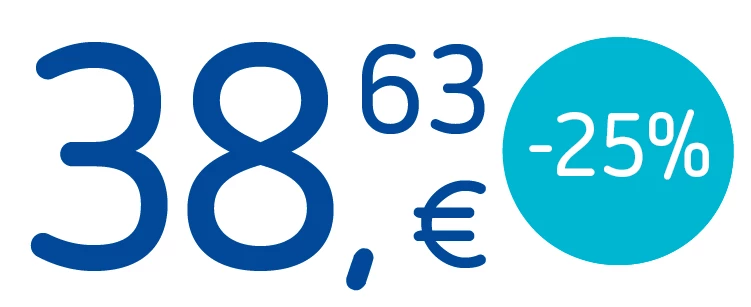


Now, I want to make the % symbol smaller, but when I reduce the character size by points, h/v scaling or sub-script, the underline effect disappears. When reducing the thickness, the underline shows again but only on the figure, leaving the % clear:
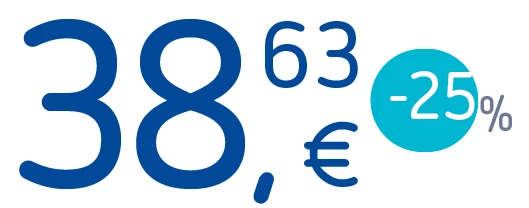


Any solution?


This topic has been closed for replies.

6 replies

akidaniel
akidanielAuthor
Participating Frequently
September 14, 2023

I found a solution, but it's not my favorite: replacing the font of the % character with GREP. There are fonts whose % is smaller than the size of the numbers, so, the font size is the same but the % is smaller.

Inspiring
September 14, 2023

I am interest to see FRIdNGE's solution.

FRIdNGE
September 15, 2023

… After having created a good template (with 1 and 2 digits), if the size bothers you, select the text frame and with the black arrow tool, select a corner and increase/decrease the text frame size (+ Shift-cmd on Mac OSX).

Then, create the corresponding char styles/grep styles (+ maybe some fine adjustments).

Here, I've used "Minion Pro-Regular.


Now I just select all the text frames and apply the "PRICE_SMALL _FRIdNGE" right para style.


(^/)

Scott Falkner
Community Expert
Community Expert
September 14, 2023

Instead of changing the point size of the % change the horizontal and vertical scaling. This will keep the point size the same as far as InDesign is concerned. Untested.

akidaniel
akidanielAuthor
Participating Frequently
September 14, 2023

Already tried it, doesn't work: size, h/v percentage and sub-script

Peter Kahrel
Community Expert
Community Expert
September 14, 2023

Did you try @jmlevy's solution?

Inspiring
September 14, 2023

Try using another GREP style in the same paragraph style to apply another character style to reduce the font size of the %.

akidaniel
akidanielAuthor
Participating Frequently
September 14, 2023

Already tried, it doesn't work, even changing the GREPS order


Robert at ID-Tasker
Legend
September 14, 2023

Can you share your INDD document? Just one TF with an example of this text. 


Robert at ID-Tasker
Legend
September 13, 2023

What if you do % as sub / super script? 


akidaniel
akidanielAuthor
Participating Frequently
September 13, 2023

It doesn't work, it seems that every way to make the % smaller breaks the underlying

Robert at ID-Tasker
Legend
September 13, 2023

Your 2nd screenshot looks like % is completely losing applied CharStyle? 


jmlevy
Community Expert
Community Expert
September 13, 2023

Instead of using a rule, I suggest you another way: insert a bullet at tte beginning before the minus sign and use a different point size, baseline shift and kerning to achieve this result.