
Participant
November 27, 2023
Answered

Guide Line Help?

  • November 27, 2023
  • 2 replies
  • 439 views

Hello, I am a student who is still learning the InDesign program. Last semester my instructor added these guidelines to the corners of my papers (I am not sure what they are, or if they are even guides). They only show up when I export my projects, though. They are invisible when I am working as well as if I print, but I need help deleting them off of my exports! I have attached an example below, please help! 
This topic has been closed for replies.
Correct answer Joel Cherney

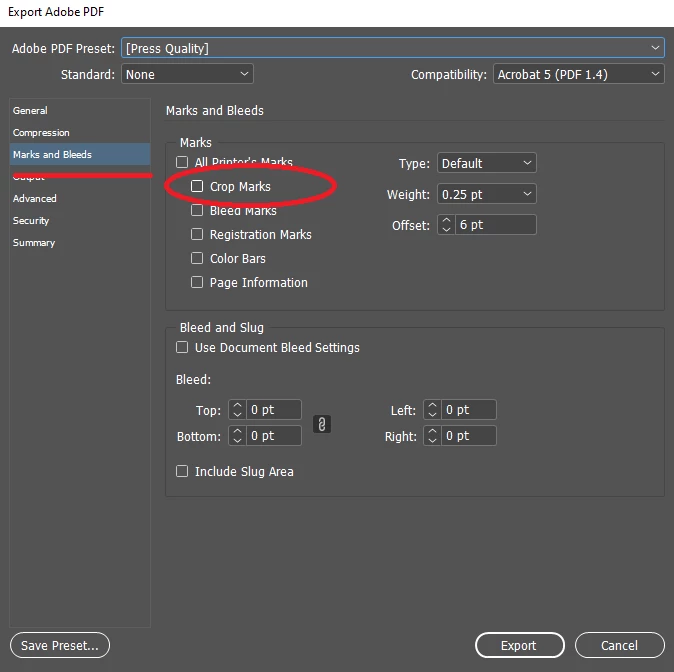
Those are called "crop marks." They're usually used to tell the printer where to cut the edge of the page off. If they are appearing in your PDF exports, the checkbox is found in the "Marks and Bleeds" section of the "PDF Export Options" dialog that appears after you choose to export a print PDF:


2 replies

Luke Jennings3
Community Expert
Community Expert
November 27, 2023
Joel Cherney
Community Expert
Joel CherneyCommunity ExpertCorrect answer
Community Expert
November 27, 2023

Those are called "crop marks." They're usually used to tell the printer where to cut the edge of the page off. If they are appearing in your PDF exports, the checkbox is found in the "Marks and Bleeds" section of the "PDF Export Options" dialog that appears after you choose to export a print PDF:


Participant
November 28, 2023

That worked, thank you so much!