
Participant
March 23, 2020
Question

Having trouble figuring this out... help please

  • March 23, 2020
  • 4 replies
  • 620 views

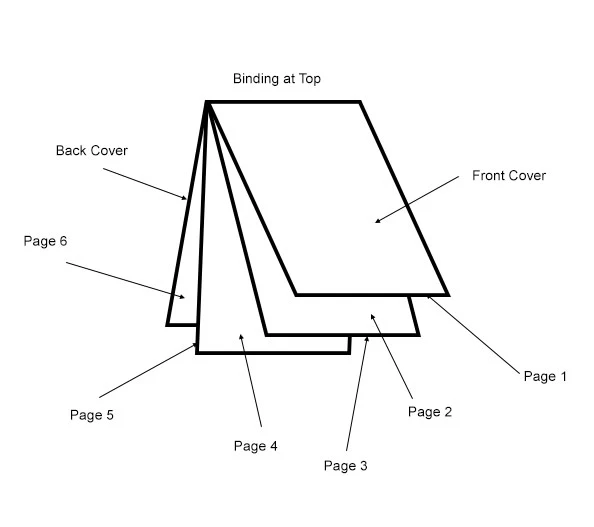
Hi, hoping someone can help. I am trying to create a booklet that would bind at the top and be used in a vertical manner. It will actually be a golf yardage book with 40 total pages including front and back cover. Page size woulkd be 4" wide by 7" high. I've tried several different approaches and just can't seem to get it to work out. I deally, I would love if I could print them 2 up on a landscape 8.5 x 11 page front and back. Here is a sketch of what I'm trying to achieve. Thanks in advance for any help.
 

This topic has been closed for replies.

4 replies

Luke Jennings
Inspiring
March 25, 2020

Typically, this would be done with an imposition program. I suggest first making a list of the printers spread pages you need- 40+1, 2+39, 38+3 and so on. Then take 10 sheets of paper and fold them in half to make a dummy. Add page numbers to your dummy, 2-up, in the desired orientation (generally, the last page would be rotated 180°). Use two InDesign files, one single page file of all pages at the desired final trim size and one at 14 x 8.5". Try to visualize your book as a normal, left binding book, but all the copy is rotated.

Place the single page InDesign file into the larger file, using your unassembled dummy pages as a guide. Export to a PDF.


Community Expert
March 24, 2020

In addition to the advice from Derek and Migintosh, you can rotate the spread through 90 degrees CW (View>Rotate Spread) work on this as a facing pages document.

Legend
March 24, 2020

In your mock-up, if the front cover and back cover were 7" tall, your paper would need to be 14", not 11.

Derek Cross
Community Expert
Community Expert
March 24, 2020

Plus bleed and grip.

Derek Cross
Community Expert
Community Expert
March 23, 2020

Are you hoping to print this yourself on your office desktop printer or put it out to a commercial printer?

If it's going to a commercial printed just produce your 40 pages separately and get your printer to do the imposition. Discuss it with the printer before proceeding.

If the booklet is to have a "self cover" I suggest, to avoid confusion, that you start the page numbering from the front cover (the number need not appear on the front cover of course).

CamikeAuthor
Participant
March 24, 2020

I am looking to print them myself.