
Siddalingayya
Known Participant
January 27, 2024
Answered

headline space issue in InDesign cc 2022

  • January 27, 2024
  • 2 replies
  • 523 views

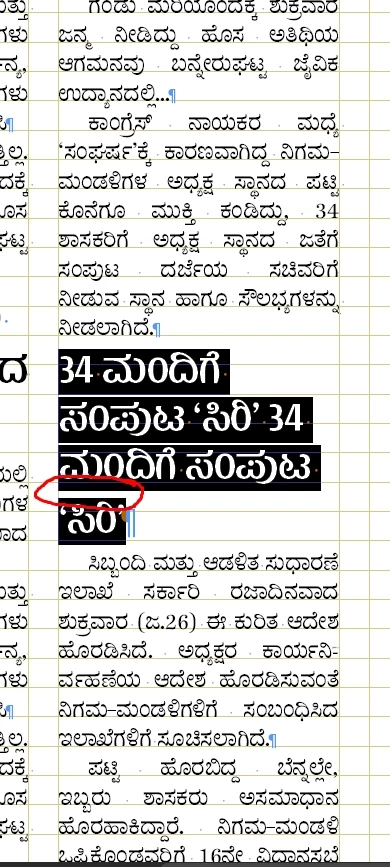
Why headline space of last line is taking little bit more comparing to rest line? This is happening only with small story headlins..? See the attachment and I have marked..


ThanX
 

This topic has been closed for replies.
Correct answer jmlevy

That is certainly because the leading value of the paragraph return value is higher than the paragraph itself. To avoid this, go to preferences > text > and tick the checkbox “apply leading to the whole paragraph”.

2 replies

Brad @ Roaring Mouse
Community Expert
Community Expert
January 27, 2024

As mentioned by @jmlevy you very likely have an override somewhere in the paragraph. My guess it's the paragraph return at the end. It's a pretty common mistake for people to select only UP to the paragraph return when they apply changes to type/leading size or apply a character style that has differing line spacing, etc, so, make sure you select ALL of the paragraph, including the paragraph return, otherwise the return may have a different line spacing than what you've appled to the rest.. (to check, select JUST the paragraph return and see if it has different leading than the rest of the copy.)

Easiest way to select the WHOLE paragraph is to quadruple click on the copy, that will include the return. Check that you have no "+" in the Styles menu.

jmlevy
Community Expert
jmlevyCommunity ExpertCorrect answer
Community Expert
January 27, 2024

That is certainly because the leading value of the paragraph return value is higher than the paragraph itself. To avoid this, go to preferences > text > and tick the checkbox “apply leading to the whole paragraph”.

Siddalingayya
Known Participant
January 29, 2024

ThanQ jmlevy..

It works as I required..
